

製品ガイド
AI・音声
AI 音声アシスタント
Volcengine
カメラ・ビジョン
カメラ機能
M5Camera
PoECAM
Unit CamS3 / CamS3-5MP
通信・IoT
産業制御・計測
Air Quality
PowerHub
StamPLC
VAMeter
T-Lite
Module13.2 PPS
Unit RollerCAN
表示・インタラクション
Paper
PaperColor
StopWatch
Tab5 Keyboard
Chain DualKey
ロボット・メイカー
Atom Printer
Bala
Bala2
BalaC Plus
Faces Kit Gameboy
RoverC & JoyC
StampFly & Atom Joystick
ファームウェア・デバイス保守
V-function
機能説明
V-Function は、M5Stack チームが M5StickV/UnitV デバイス向けに開発した複数の視覚認識機能ファームウェアです。カメラは視覚認識を完了すると、シリアル出力(115200bps)で認識結果を出力します。対象追跡、動体検出など、さまざまな機能ファームウェアに基づいて、ユーザーは視覚認識機能をすばやく構築できます。本チュートリアルでは、ファームウェアをデバイスに書き込む方法と、UiFlow のグラフィカルプログラミングから呼び出す方法を紹介します。
ドライバーのインストール
- 下記の一覧からお使いの OS に対応するドライバファイルを選択し、ダウンロードして展開してください。FTDI Chip 公式サイトから、その他のバージョンの FTDI ドライバを入手することもできます。
| ドライバ名 | ダウンロードリンク |
|---|---|
| Windows_Desktop_x64 | Download |
| Windows_Desktop_x86_32 | Download |
| Windows_Desktop_ARM | Download |
| MacOS_Intel | Download |
| MacOS_ARM64 | Download |
- デバイスを PC に接続し、デバイスマネージャーを開いて FTDI ドライバをインストールします(下図は Windows 10 環境の例です)。(注意:一部のシステム環境では、ドライバを 2 回インストールしないと有効にならない場合があります。未認識のデバイス名は通常
M5StackまたはUSB Serialです。)
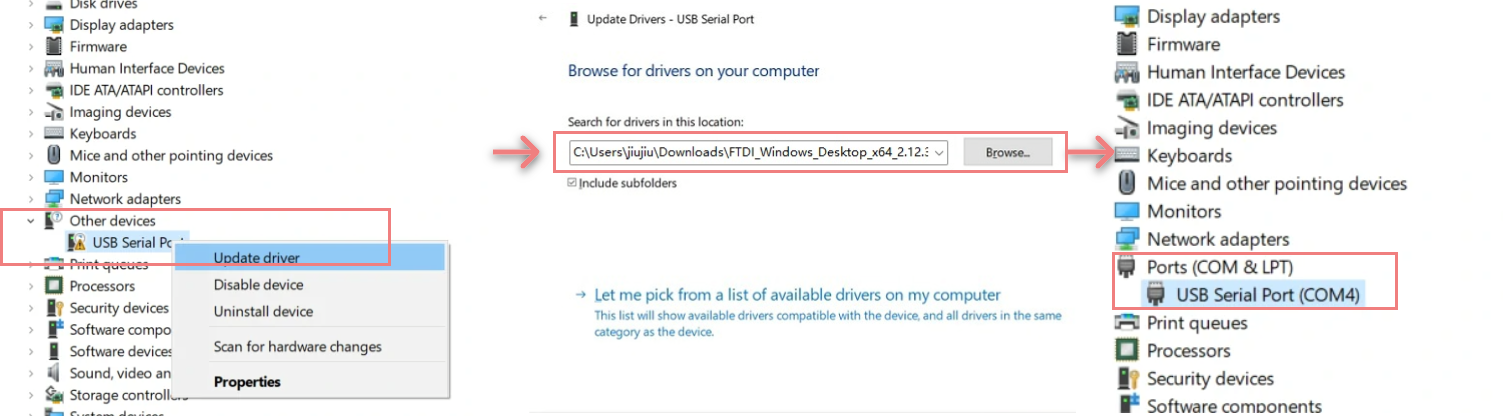
システム環境設定 -> セキュリティとプライバシー -> 一般 -> ダウンロードしたアプリの実行を許可する -> App Storeと確認済みの開発元 に移動してください。ファームウェアの書き込み
お使いのオペレーティングシステムに応じて、下のボタンから対応する M5Burner ファームウェア書き込みツールをダウンロードしてください。解凍してアプリケーションを起動します。
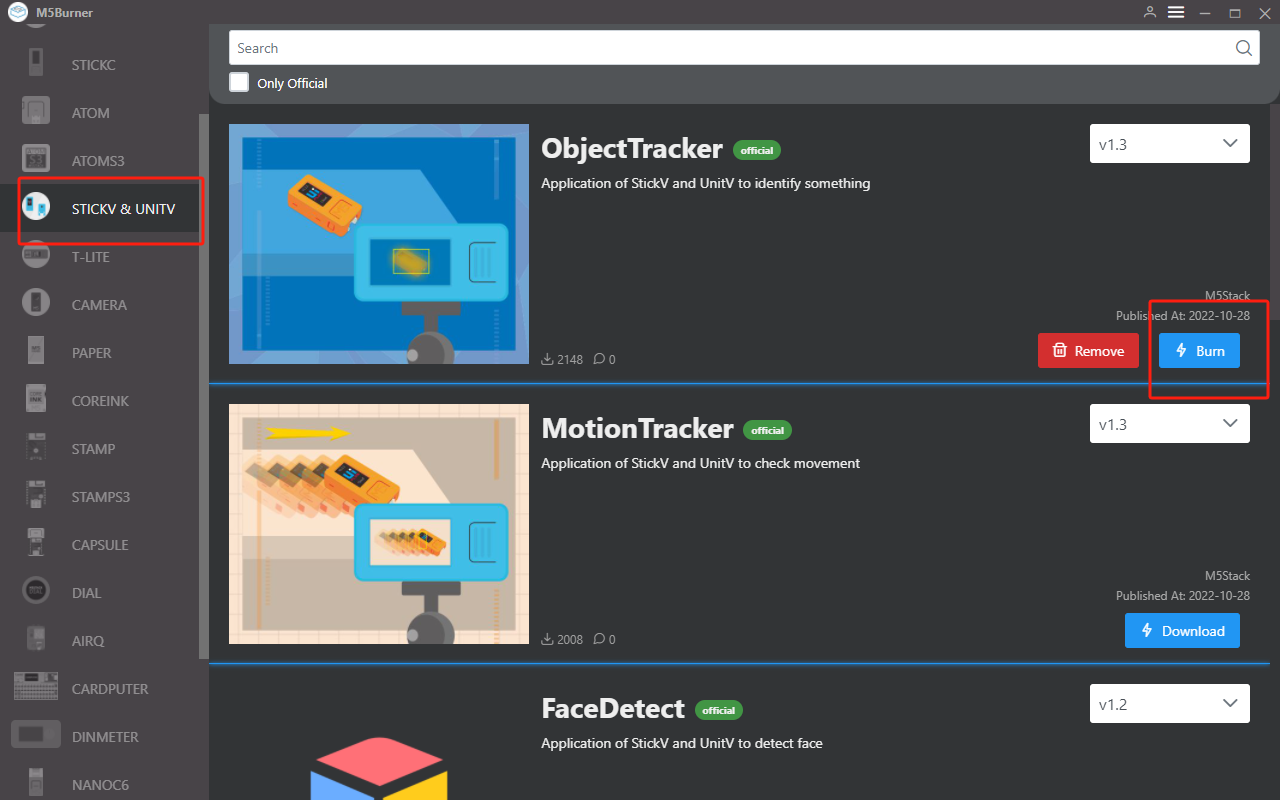
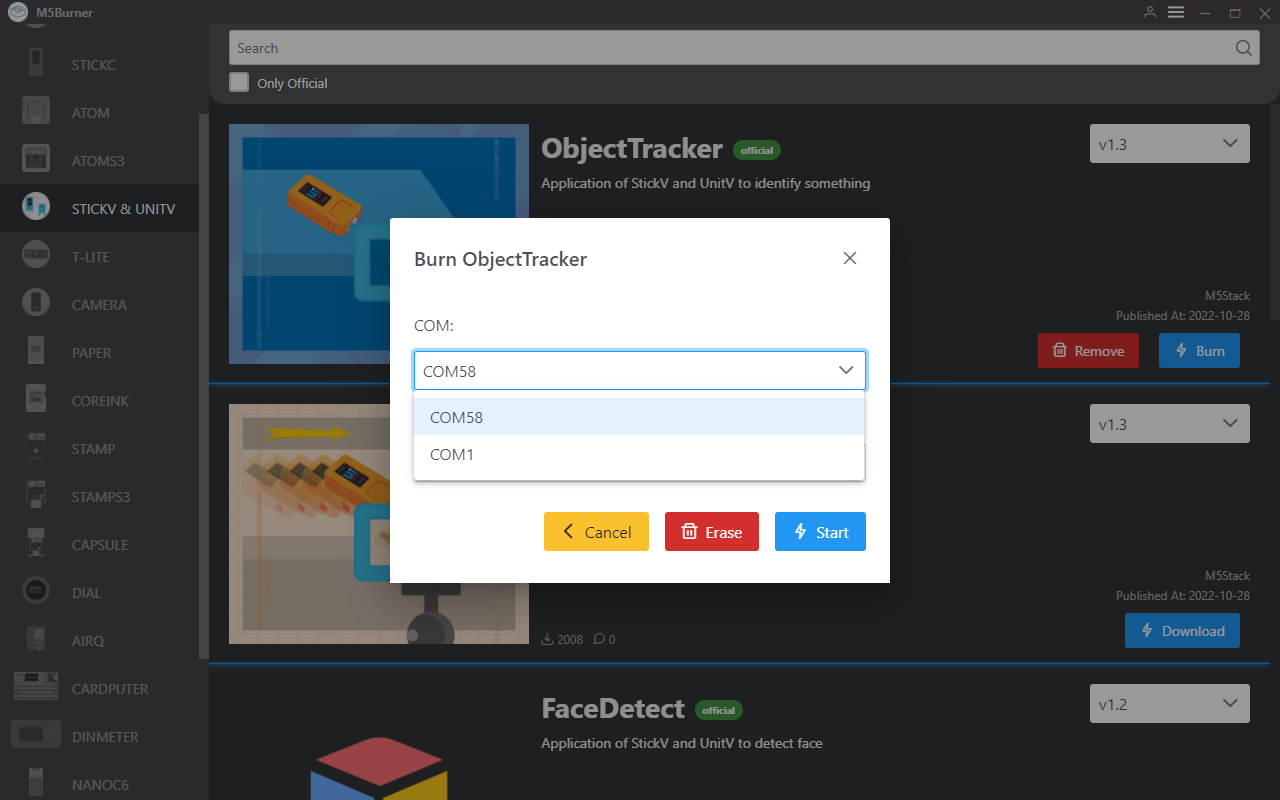
左側のデバイス欄でデバイスを M5StickV/UnitV に選択し、用途に応じて対応する機能ファームウェアを選択してダウンロードします。M5StickV/UnitV をデータケーブルでパソコンに接続し、対応するポートを選択して Burn をクリックすると書き込みが開始されます。
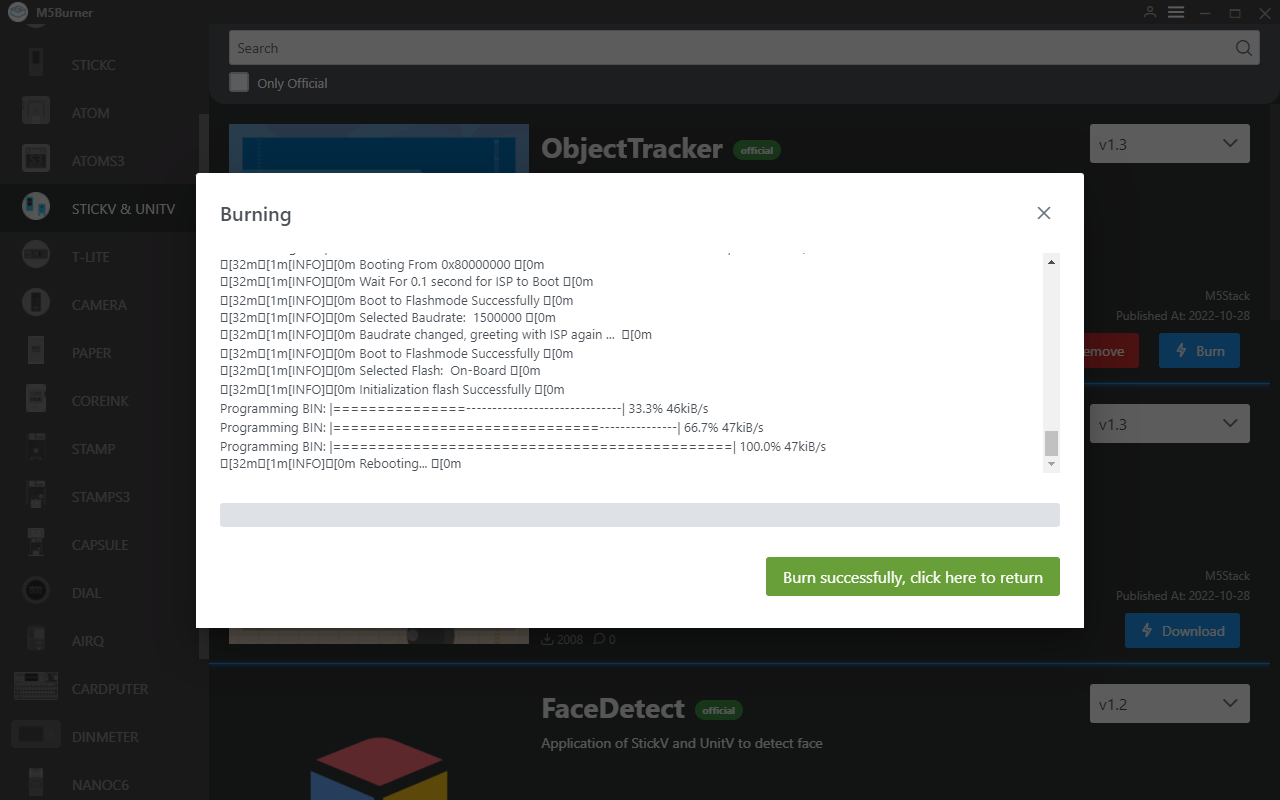
書き込みログに Burn Successfully と表示されたら、ファームウェアの書き込みは完了です。
UiFlow での使用
機能ファームウェアを書き込んだ M5StickV/UnitV は Unit 形式のスレーブデバイスとして使用されるため、ユーザーは他の M5 ホストデバイスを使用して操作する必要があります。他のメインコントローラー製品での UiFlow の基本的な使用方法と操作については、それぞれの製品ドキュメントページを参照してください。
https://flow.m5stack.com/ にアクセスして UiFlow を開きます。左側の機能パネルの Unit 追加ボタンをクリックし、UnitV 拡張を選択して追加します。追加時は、実際に使用するポートに合わせて設定してください。ok をクリックして追加します。
追加が完了すると、ブロックメニューの Unit オプションに含まれる機能ブロックが表示されます。右側のプログラミング領域にドラッグ&ドロップして使用できます。詳細なブロック機能の説明は、以下の UiFlow Block ドキュメントをクリックして確認してください。
動体検出
現在の画面の変化を検出し、検出領域内の物体に動きがあるかどうかを判定します。
動体検出 - データパケット形式
返却データ JSON
{
    "FUNC": "MOTION DETECT V1.0",
    "DIFF TOTAL": 10000, // Frame change rate
    "DIFF MAX": 75, // Maximum change rate
    "TOTAL": 3, // Number of bounding boxes
    "0": {
        "x": 45,
        "y": 18,
        "w": 126,
        "h": 72,
        "area": 342 // Number of changed pixels in this bounding box
    },
    "1": {
        "x": 0,
        "y": 169,
        "w": 130,
        "h": 24,
        "area": 173
    },
    "2": {
        "x": 39,
        "y": 204,
        "w": 276,
        "h": 34,
        "area": 141
    }
}
設定 JSON
{
    "MOTION DETECT": 1.0, // Function flag, cannot be omitted
    "mode": "COMPUTE_MODE_STATIC", // Optional: "COMPUTE_MODE_STATIC" static detection mode or "COMPUTE_MODE_DYNAMIC" dynamic detection mode
    "thr_w": 20, // Optional, bounding box width threshold, [3,200]
    "thr_h": 20, // Optional, bounding box height threshold, [3,200]
    "stepx": 1, // Optional, X scan interval, [0, 40]; set to 0 to disable bounding box detection
    "stepy": 2, // Optional, Y scan interval, [0, 40]; set to 0 to disable bounding box detection
    "delta": 20, // Optional, change rate threshold, [0, 99]
    "merge": 10 // Optional, bounding box merge threshold, [0, 40]
}
ターゲットトラッカー
追跡対象を設定し、画面内の対象オブジェクトの位置情報をリアルタイムで取得します。
ターゲットトラッカー - データパケット形式
返却データ JSON
{
    "FUNC": "TARGET TRACKER V1.0",
    "x": 282,
    "y": 165,
    "w": 13,
    "h": 15
}
設定 JSON
{
    "TARGET TRACKER": " V1.0",
    "x": 282, // x, y, w, and h are required
    "y": 165,
    "w": 13,
    "h": 15
}
カラートラッカー
LAB 色のしきい値を設定し、画面内でしきい値に合致する対象を追跡して、対象オブジェクトの位置情報をリアルタイムで取得します。
カラートラッカー - データパケット形式
返却データ JSON
{
    "FUNC": "COLOR TRACKER V1.0",
    "TOTAL": 3, // Number of bounding boxes
    "0": {
        "x": 45,
        "y": 18,
        "w": 126,
        "h": 72,
        "area": 342 // Number of changed pixels in this bounding box
    },
    "1": {
        "x": 0,
        "y": 169,
        "w": 130,
        "h": 24,
        "area": 173
    },
    "2": {
        "x": 39,
        "y": 204,
        "w": 276,
        "h": 34,
        "area": 141
    }
}
設定 JSON
{
    "COLOR TRACKER": 1.0, // Function flag, cannot be omitted
    "thr_w": 20, // Optional, bounding box width threshold, [3,200]
    "thr_h": 20, // Optional, bounding box height threshold, [3,200]
    "stepx": 1, // Optional, X scan interval, [0, 40]; set to 0 to disable bounding box detection
    "stepy": 2, // Optional, Y scan interval, [0, 40]; set to 0 to disable bounding box detection
    "merge": 10, // Optional, bounding box merge threshold, [0, 40]
    "Lmin": 0, // Optional, L threshold lower limit [0, 100]
    "Lmax": 0, // Optional, L threshold upper limit [0, 100]
    "Amin": 0, // Optional, A threshold lower limit [0, 255]
    "Amax": 0, // Optional, A threshold upper limit [0, 255]
    "Bmin": 0, // Optional, B threshold lower limit [0, 255]
    "Bmax": 0, // Optional, B threshold upper limit [0, 255]
}
顔検出
画面内の顔情報を認識し、認識数、対象の座標、信頼度を返します。
顔検出 - データパケット形式
返却データ JSON
{
   "FUNC": "FACE DETECT",  // Function description
   "count": 3,   // Number of detected faces
   "2": {  // Face index
      "x": 97,    // ROI
      "y": 26,
      "w": 64,
      "h": 86,
      "value": 0.859508,  // Confidence
      "classid": 0,
      "index": 2,
      "objnum": 3
   },
   "1": {
      "x": 70,
      "y": 157,
      "w": 38,
      "h": 63,
      "value": 0.712100,
      "classid": 0,
      "index": 1,
      "objnum": 3
   },
   "0": {
      "x": 199,
      "y": 145,
      "w": 31,
      "h": 40,
      "value": 0.859508,
      "classid": 0,
      "index": 0,
      "objnum": 3
   }
}
QR コード認識
画面内の QR コードを認識し、認識結果とバージョンを返します。ファームウェア Find code を使用します。
返却データ JSON
{
   "count": 1,
   "FUNC": "FIND QRCODE",
   "0": {
      "x": 57,
      "y": 16,
      "w": 197,
      "h": 198,
      "payload": "m5stack",    // QR code data
      "version": 1,    // QR code version
      "ecc_level": 1,    // QR code ECC level
      "mask": 2,    // QR code mask
      "data_type": 4,    // QR code data type
      "eci": 0    // ECI of the QR code
   }
}
バーコード認識
画面内のバーコードを認識し、認識結果とバージョンを返します。ファームウェア Find code を使用します。
返却データ JSON
{
    "0": {
        "x": 62,
        "y": 90,
        "w": 100,
        "h": 45,
        "payload": "123", // Data
        "type": 15, // Barcode type
        "rotation": 0.000000, // Barcode rotation angle
        "quality": 28 // Number of times the barcode was scanned in the image
    },
    "count": 1,
    "FUNC": "FIND BARCODE"
}
Datamatrix コード認識
画面内の Datamatrix コードを認識し、認識結果、コードの回転角度、座標データを返します。ファームウェア Find code を使用します。
返却データ JSON
{
    "0": {
        "x": 20,
        "y": 116,
        "w": 96,
        "h": 96,
        "payload": "m5stack",
        "rotation": 1.588250, // DM code rotation angle
        "rows": 16, // Number of DM code rows
        "columns": 16, // Number of DM code columns
        "capacity": 12, // DM code capacity (bytes)
        "padding": 1 // Remaining DM code capacity (bytes)
    },
    "count": 1,
    "FUNC": "FIND DATAMATRIX"
}
AprilTag コード認識
画面内の AprilTag コード(Tag36H11 タイプのみ対応)を認識し、その位置のオフセットを取得します。ファームウェア Find code を使用します。
返却データ JSON
{
    "0": {
        "x": 71,
        "y": 5,
        "w": 85,
        "h": 88,
        "id": 1,
        "family": 16,// AprilTag family
        "cx": 115,
        "cy": 49,
        "rotation": 6.219228,// Rotation angle of AprilTag in radians (int).
        "decision_margin": 0.451959,// Color saturation of AprilTag matching (values from 0.0 to 1.0), where 1.0 is optimal.
        "hamming": 0,// Acceptable number of bit errors for AprilTag
        "goodness": 0.000000, // Color saturation of AprilTag image
        "x_translation": 0.868200, // Number of units to move the image left or right after rotation
        "y_translation": 0.245313,// Number of units to move the image up or down after rotation
        "z_translation": -2.725188,// Amount scaled by the image. Default is 1.0
        "x_rotation": 3.093776,// Degrees to rotate the image around the x-axis in the frame buffer
        "y_rotation": 0.065489,// Degrees to rotate the image around the y-axis in the frame buffer
        "z_rotation": 6.219228 // Degrees to rotate the image around the z-axis in the frame buffer
    },
    "count": 1,
    "FUNC": "FIND APRILTAG"
}
認識モード設定 JSON
上記の複数の認識コード機能は、すべて同じファームウェア Find Code で実装されています。ユーザーは以下の JSON データを送信して、モードの切り替えを設定できます。
{
    "FIND CODE": 1.0,
    "mode":"DATAMATRIX" // Recognition mode, options: QRCODE, APRILTAG, DATAMATRIX, BARCODE
}カスタムタグ認識
画面内のタグカードを検出し、バイナリシーケンスを返します。注:固定のタグカード形式のみ認識します。以下の画像を参照してください。
カスタムタグ認識 - データパケット形式
返却データ JSON
{
    "FUNC": "TAG READER V2.0",
    "TOTAL": 1,
    "0": {
        "x": 113,
        "y": 65,
        "w": 117,
        "h": 105,
        "p0x": 113, // p0x to p3y: Coordinates of the 4 vertices of the TAG
        "p0y": 77,
        "p1x": 211,
        "p1y": 65,
        "p2x": 230,
        "p2y": 156,
        "p3x": 127,
        "p3y": 170,
        "rotation": 8, // Relative rotation angle of the TAG
        "rows": 8, // Number of rows of the TAG (excluding the locator frame)
        "columns": 8, // Number of columns of the TAG (excluding the locator frame)
        "size": 64, // Length of the actual content of the TAG, this value = number of rows * number of columns = (rows) * (columns)
        "code": "0x003C42425A424200", // uint64_t type content binary code, maximum encoding of 64 bits (8 x 8) TAG
        "binstr": "0000000000111100010000100100001001011010010000100100001000000000" // Binary data string, this value can encode TAGs of any length and width
    }
}
ライントラッカー
画面内の指定した色のラインを検出し、オフセット角度を返します。
ライントラッカー - データパケット形式
返却データ JSON
{
    "FUNC": "LINE TRACKER V1.0",
    "angle": 3.8593475818634033 // Angle of turning the car
}
設定 JSON
{
    "LINE  TRACKER": 1.0, // Function flag, cannot be omitted
    "thr_w": 20, // Optional, width threshold of the bounding box, [3,200]
    "thr_h": 20, // Optional, length threshold of the bounding box, [3,200]
    "stepx": 1, // Optional, X scan interval, [0, 40]; set to 0 to disable bounding box detection
    "stepy": 2, // Optional, Y scan interval, [0, 40]; set to 0 to disable bounding box detection
    "merge": 10, // Optional, bounding box merge threshold, [0, 40]
    "Lmin": 0, // Optional, L threshold lower limit [0, 100]
    "Lmax": 0, // Optional, L threshold upper limit [0, 100]
    "Amin": 0, // Optional, A threshold lower limit [0, 255]
    "Amax": 0, // Optional, A threshold upper limit [0, 255]
    "Bmin": 0, // Optional, B threshold lower limit [0, 255]
    "Bmax": 0, // Optional, B threshold upper limit [0, 255]
    "weight_0": 0.1, // Optional, weight
    "weight_1": 0.3, // Optional, weight
    "weight_2": 0.7  // Optional, weight
}
関連コンテンツ
よくある質問
スレーブデバイス(M5StickV/UnitV)をメインコントローラーに接続した後、メインコントローラー側でデータ取得が正常に行われない場合は、M5StickV/UnitV を再起動してください。ファームウェアの起動が完了するのを待ってから、接続を再試行してください。