

StackFlow AI Platform
Model Library
Speech Recognition & Audio
Development Examples
OpenAI-Compatible API
LLM630 Compute Kit VLM Camera
This example uses the StackFlow TCP API to call the VLM service on the LLM630 Compute Kit from a PC and run visual language inference on camera images.
1. Preparation
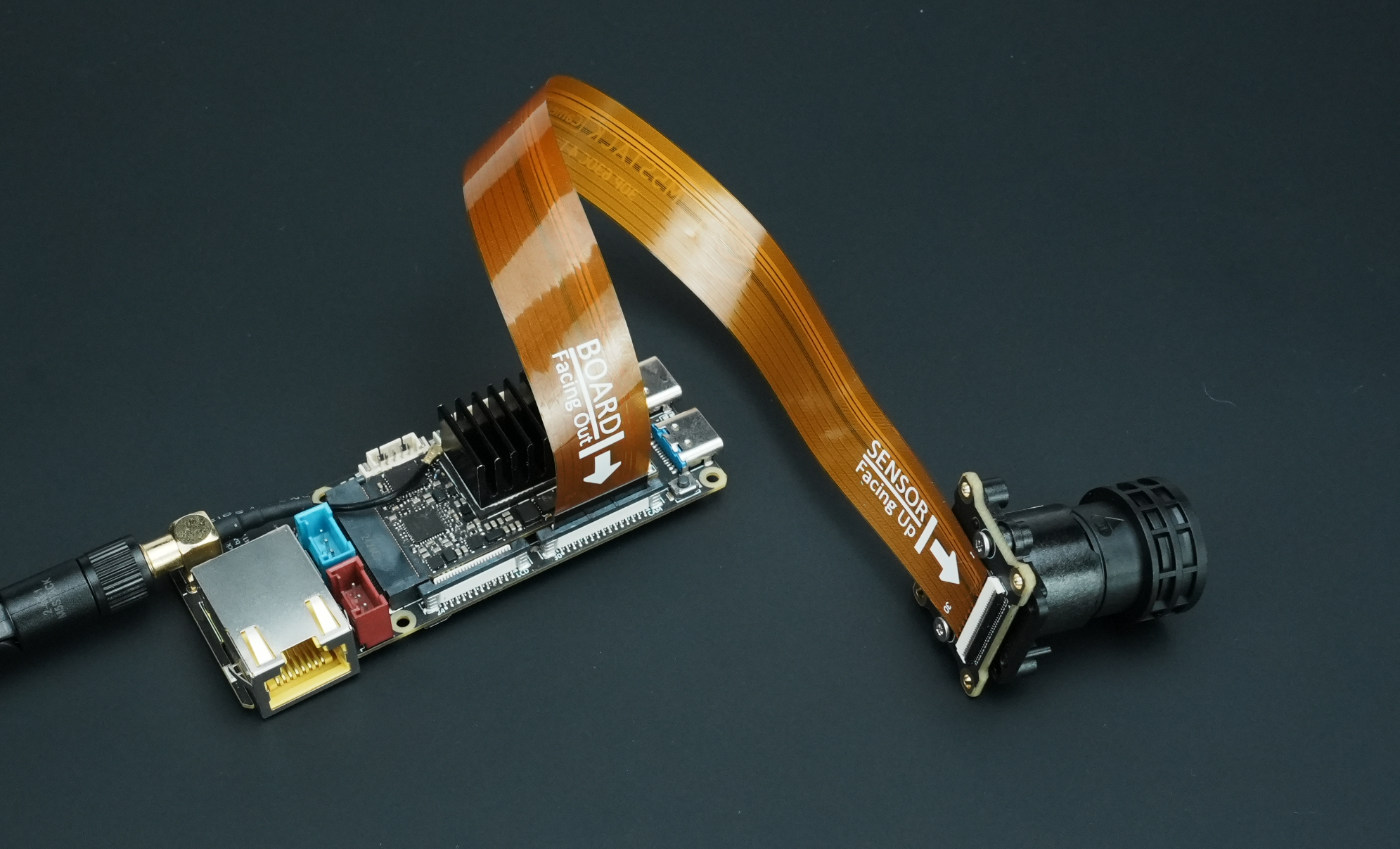
- Before powering on the kit, connect the CamModule SC850SL camera to the LLM630 Compute Kit with an FPC cable as shown below.
- Follow the LLM630 Compute Kit UART / ADB / SSH Setup guide to configure networking and file transfer and obtain the device IP address.
- Follow the LLM630 Compute Kit Software Package Update guide to install the software and model packages below.
apt install llm-camera llm-vlm # SoftWare PackageNote
Disable AI-ISP on the CSI camera when using the VLM. Install the VLM model with the following command.
apt install llm-model-internvl2.5-1b-364-ax630c # Model Package2. Client Program
Download the client test script and make sure the PC and the LLM630 Compute Kit are on the same subnet.
Copy and save the script below as llm-vlm.py. When running it on a PC, pass the actual IP address of the LLM630 Compute Kit.
python llm-vlm.py --host 192.168.20.24To run the script on the kit, upload it to the LLM630 Compute Kit and run it without specifying an IP address.
adb push llm-vlm.py /rootadb shellcd /root
python3 llm-vlm.pyimport argparse
import json
import select
import socket
import sys
import time
def create_tcp_connection(host, port):
sock = socket.socket(socket.AF_INET, socket.SOCK_STREAM)
sock.connect((host, port))
return sock
def send_json(sock, data):
json_data = json.dumps(data, ensure_ascii=False) + '\n'
sock.sendall(json_data.encode('utf-8'))
recv_buffer = ""
def receive_response(sock):
global recv_buffer
while '\n' not in recv_buffer:
part = sock.recv(4096).decode('utf-8')
if not part:
break
recv_buffer += part
if '\n' in recv_buffer:
line, recv_buffer = recv_buffer.split('\n', 1)
return line.strip()
else:
line, recv_buffer = recv_buffer, ""
return line.strip()
def close_connection(sock):
if sock:
sock.close()
def create_init_data(response_format, device, enoutput, frame_height, frame_width, enable_webstream, rtsp):
return {
"request_id": "camera_001",
"work_id": "camera",
"action": "setup",
"object": "camera.setup",
"data": {
"response_format": "image.yuvraw.base64" if response_format =="yuv" else "image.jpeg.base64",
"input": device,
"enoutput": enoutput,
"frame_width": frame_width,
"frame_height": frame_height,
"enable_webstream": enable_webstream,
"rtsp": "rtsp.1280x720.h265" if rtsp == "h265" else "rtsp.1280x720.h264",
"VinParam.bAiispEnable": 0,
}
}
def parse_setup_response(response_data):
error = response_data.get('error')
if error and error.get('code') != 0:
print(f"Error Code: {error['code']}, Message: {error['message']}")
return None
return response_data.get('work_id')
def reset(sock):
sent_request_id = 'reset_000'
reset_data = {
"request_id": sent_request_id,
"work_id": "sys",
"action": "reset"
}
ping_data = {
"request_id": "ping_000",
"work_id": "sys",
"action": "ping"
}
send_json(sock, reset_data)
while True:
try:
send_json(sock, ping_data)
time.sleep(1)
except (BrokenPipeError, ConnectionResetError, OSError) as e:
return # Sock disconnection indicates reset is complete
def setup(sock, init_data):
sent_request_id = init_data['request_id']
send_json(sock, init_data)
while True:
response = receive_response(sock)
response_data = json.loads(response)
if response_data.get('request_id') == sent_request_id:
return parse_setup_response(response_data)
def exit_session(sock, deinit_data):
send_json(sock, deinit_data)
print("Exit")
def parse_inference_response(response_data):
error = response_data.get('error')
if error and error.get('code') != 0:
print(f"Error Code: {error['code']}, Message: {error['message']}")
return None
return {
"work_id": response_data.get("work_id"),
"object": response_data.get("object"),
"data": response_data.get("data")
}
def main(args):
sock = create_tcp_connection(args.host, args.port)
frame_height, frame_width = args.imgsz
try:
print("Reset...")
# reset(sock)
close_connection(sock)
sock = create_tcp_connection(args.host, args.port)
print("Setup VLM...")
vlm_init_data = {
"request_id": "vlm_001",
"work_id": "vlm",
"action": "setup",
"object": "vlm.setup",
"data": {
"model": args.model,
"response_format": "llm.utf-8.stream",
"input": "vlm.utf-8",
"enoutput": True,
"max_token_len": 1023,
"prompt": "You are a knowledgeable assistant capable of answering various questions and providing information."
}
}
vlm_work_id = setup(sock, vlm_init_data)
if vlm_work_id is not None:
print(f"VLM setup with work_id: {vlm_work_id}")
else:
print("VLM setup failed.")
return
print("Setup Camera...")
init_data = create_init_data(
response_format = args.format,
enoutput=args.enoutput,
device=args.device,
frame_height=frame_height,
frame_width=frame_width,
enable_webstream=args.webstream,
rtsp=args.rtsp
)
camera_work_id = setup(sock, init_data)
if camera_work_id is not None:
print(f"Camera setup with work_id: {camera_work_id}")
else:
print("Camera setup failed.")
return
print("Press 'q' to exit")
print("Link Camera to VLM...")
link_data = {
"request_id": "vlm_001",
"work_id": vlm_work_id,
"action": "link",
"object": "work_id",
"data": camera_work_id,
}
send_json(sock, link_data)
while True:
user_input = input("Enter your message (or 'exit' to quit): ")
if user_input.lower() == 'exit':
break
send_json(sock, {
"request_id": "llm_001",
"work_id": vlm_work_id,
"action": "inference",
"object": "vlm.utf-8.stream",
"data": {
"delta": user_input,
"index": 0,
"finish": True
}
})
while True:
response = receive_response(sock)
if not response:
continue
response_data = json.loads(response)
Rawdata = parse_inference_response(response_data)
if Rawdata is None:
break
work_id = Rawdata.get("work_id")
object = Rawdata.get("object")
data = Rawdata.get("data")
if work_id == vlm_work_id and object == "llm.utf-8.stream":
delata = data.get('delta')
finish = data.get('finish')
print(delata, end='', flush=True)
if finish:
print()
break
exit_session(sock, {
"request_id": "vlm_exit",
"work_id": vlm_work_id,
"action": "exit"
})
exit_session(sock, {
"request_id": "camera_exit",
"work_id": camera_work_id,
"action": "exit"
})
time.sleep(3) # Allow time for the exit command to be processed
finally:
close_connection(sock)
if __name__ == "__main__":
parser = argparse.ArgumentParser(description="TCP Client to send JSON data.")
parser.add_argument("--host", type=str, default="localhost", help="Server hostname (default: localhost)")
parser.add_argument("--port", type=int, default=10001, help="Server port (default: 10001)")
parser.add_argument("--device", type=str, default="axera_single_sc850sl", help="Camera name, i.e. axera_single_sc850sl or /dev/video0")
parser.add_argument("--enoutput", type=bool, default=False, help="Whether to output image data")
parser.add_argument("--format", "--output-format", type=str, default="yuv", help="Output image data format, i.e. jpeg or yuv")
parser.add_argument("--imgsz", "--img", "--img-size", nargs="+", type=int, default=[320, 320], help="image (h, w)")
parser.add_argument("--webstream", action="store_true", help="Enable webstream")
parser.add_argument("--rtsp", default="h264", help="rtsp output, i.e. h264 or h265")
parser.add_argument("--model", type=str, default="internvl2.5-1B-364-ax630c", help="Model name, i.e. internvl2.5-1B-364-ax630c or smolvlm-256M-ax630c, smolvlm-500M-ax630c")
args = parser.parse_args()
main(args)Parameters
- host: IP address of the LLM630 Compute Kit
- port: TCP port, default
10001 - device: Camera name. Use
axera_single_sc850slfor the MIPI CSI camera. For a USB camera, specify the device path, such as/dev/video0. - enoutput: Enable image data output. Disabled by default.
- format: Output image format. Defaults to
yuv. You can also usejpeg. - imgsz: Output image size, default
320 × 320 - webstream: Enable the camera preview on the LLM630 Compute Kit. Disabled by default. Run the script with
--webstreamand openhttp://<device-ip>:8989/in a browser. VLM inference results appear in the terminal running the script. - rtsp: RTSP stream codec. Defaults to
h264. You can also useh265. - model: VLM model to load. Defaults to
internvl2.5-1B-364-ax630c. To use smolvlm-256M-ax630c or smolvlm-500M-ax630c, install the model manually first.
3. Start Interacting
Enter your message (or 'exit' to quit): Please describe this image.
The image shows a person sitting in what appears to be a vehicle, wearing a white T-shirt with a logo that reads "MSSTAFF SW." In the background, there are people working, and the setting seems to be indoors with some industrial or office elements visible.
Page Tools