

UiFlow Tutorial
UiFlow1 Quick Start
2. Firmware & Program
UiFlow1 Development Guide
Project Management
Use LTE network
UiFlow1 Blockly
Event
UI
Unit
Module
Hat
UiFlow2 Quick Start
2. Firmware & Program
UiFlow2 Development Guide
UI Editor
UiFlow2 Video Column
Unit CardKB
Example
Get the ASIIC value and click status of the button
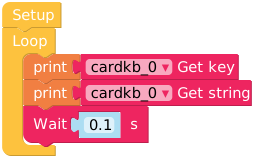
from m5stack import *
from m5ui import *
from uiflow import *
import time
import unit

setScreenColor(0x222222)
cardkb_0 = unit.get(unit.CARDKB, unit.PORTA)

while True:
  print(cardkb_0.keyData)
  print(cardkb_0.keyString)
  wait(0.1)
wait_ms(2)API

print(cardkb_0.keyData)- Return the ASIIC value

print(cardkb_0.isNewKeyPress())- Return character

print(cardkb_0.keyString)- Detect the key, press it to return to true
Page Tools