

Arduino入門
2. デバイス&サンプル
3. M5Unified
4. M5GFX
5. 拡張モジュール&サンプル
Unit
Module
Atomic
Tab5
IoT
アクセサリー
Unit Cat1-CN Arduino チュートリアル
1. 準備作業
- 環境構築:Arduino IDE 入門ガイドを参考にIDEをインストールし、使用する開発ボードに応じてボードマネージャと必要なライブラリをインストールしてください。
- 使用ライブラリ:
注意
GitHubから最新のライブラリバージョンをダウンロードする必要があります。ライブラリアドレス:TinyGSM - M5Stack GitHub。Arduino Libraryからのダウンロードはしないでください。(ご不明な点がございましたら、こちらのチュートリアルをご参考ください)
- 使用ハードウェア:
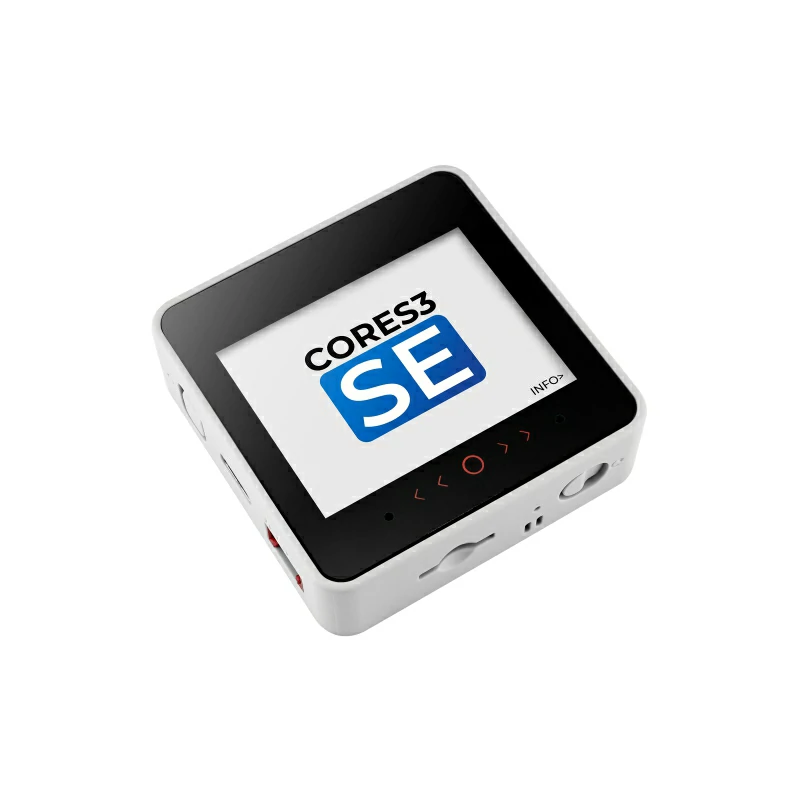
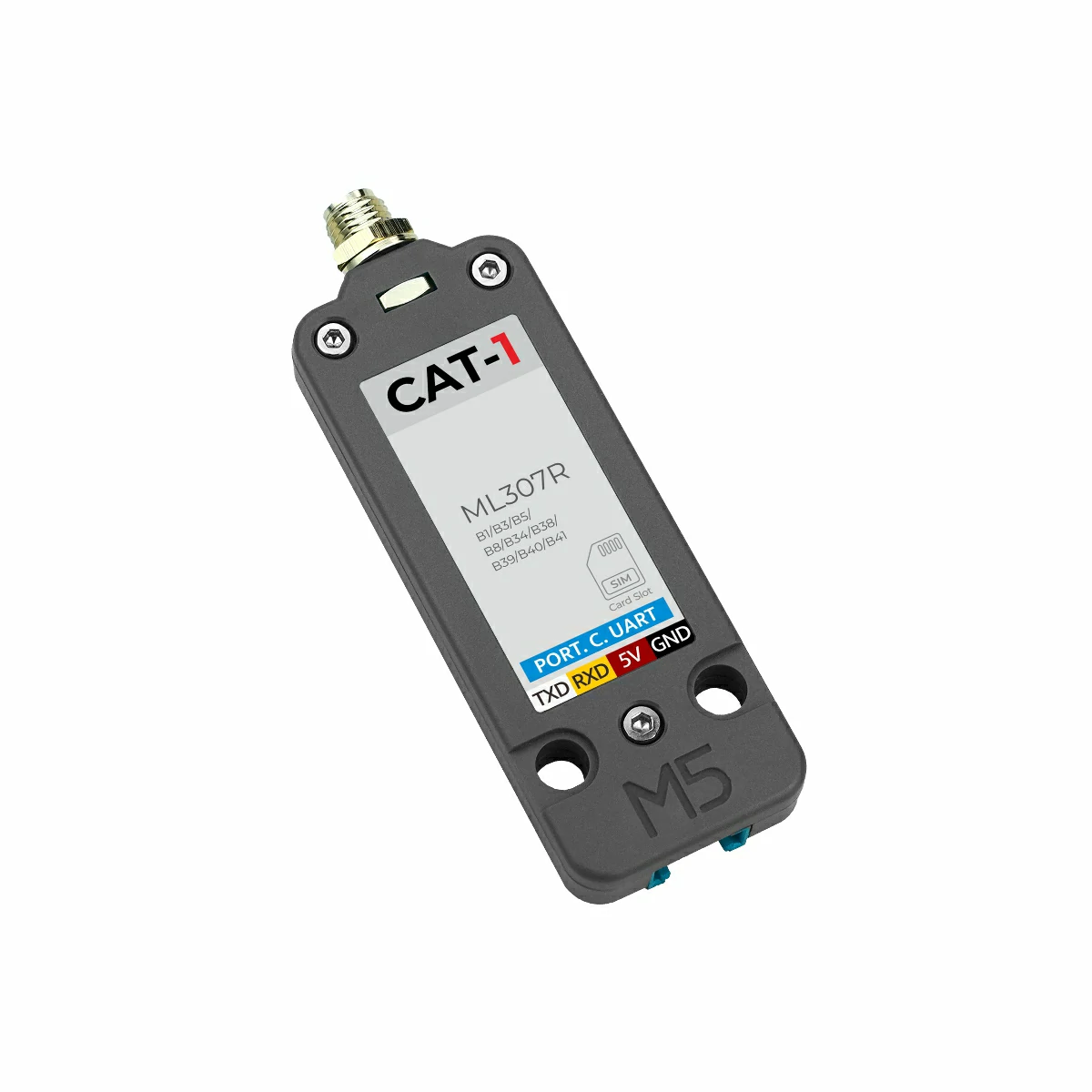
2. 注意事項
ピン互換性
各ホストのピン配置が異なるため、ご使用前に製品ドキュメントのピン互換表を参照し、実際の配線に合わせてサンプルプログラムを修正してください。
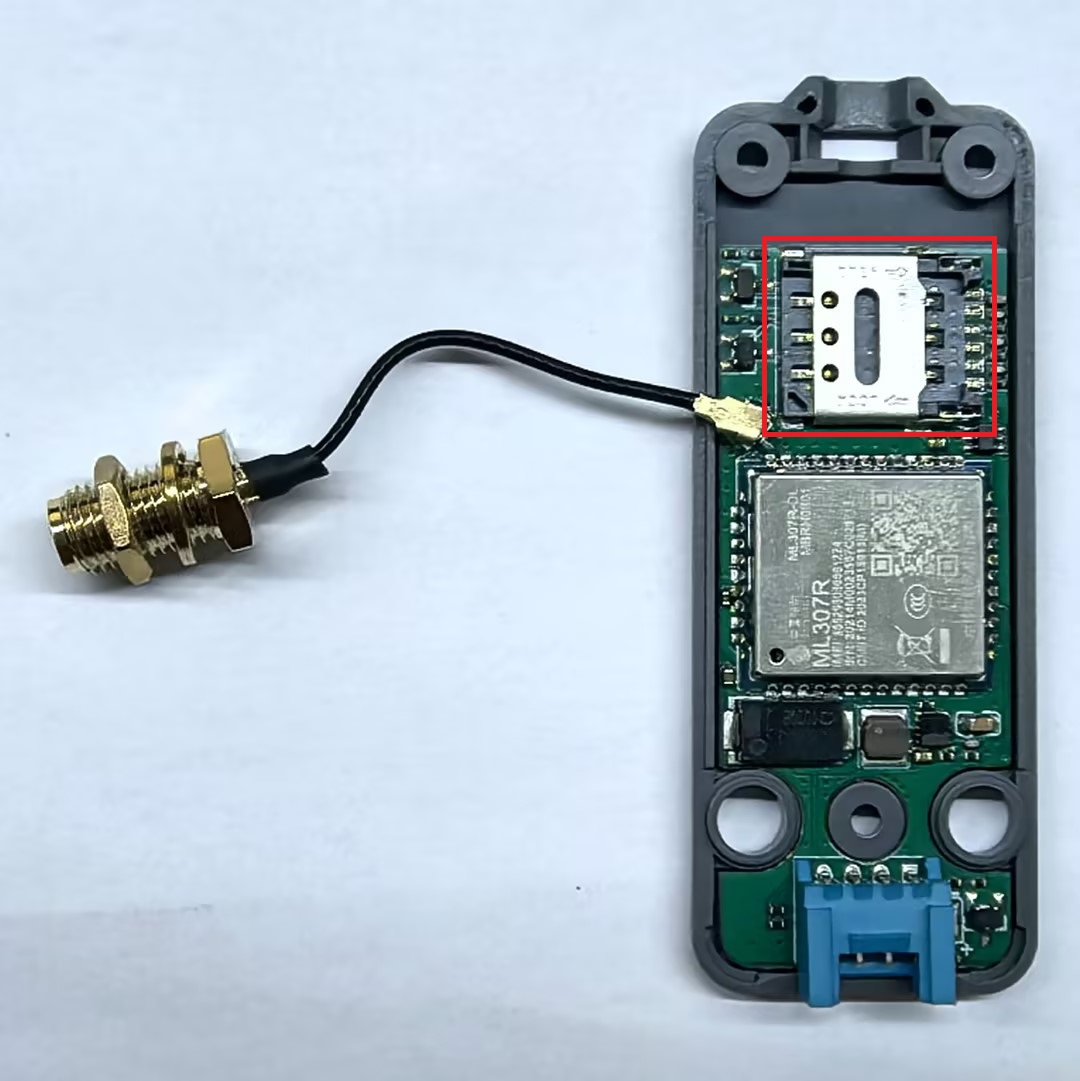
Unit Cat1-CNをご使用前に、LTE Cat1ネットワークに対応したSIMカードを挿入し、データサービスを有効化していることを確認してください(China Mobile、China Unicom、China Telecom の標準SIMカードが使用できます)。SIMカードスロットはモジュール内部に位置しています。Unit Cat1-CNの底部の3本のネジを六角ドライバーで取り外し、その後反転させて、底部カバーを取り外します。スロットの具体的な位置は下図の赤枠に示されています:
3. サンプルプログラム
- 本チュートリアルで使用するメインコントローラはCoreS3で、Unit Cat1-CNと組み合わせて使用します。本通信モジュールはUART通信を採用しています。実際の配線に合わせてプログラム内のピン定義を修正してください。接続後の対応UART IOは
G17 (RX)、G18 (TX)です。
Unit Cat1-CNは複数の通信プロトコルをサポートしています。以下はMQTTとHTTPの2つのプロトコルのサンプルプログラムを提供しています。
3.1 MQTT
cpp
1 2 3 4 5 6 7 8 9 10 11 12 13 14 15 16 17 18 19 20 21 22 23 24 25 26 27 28 29 30 31 32 33 34 35 36 37 38 39 40 41 42 43 44 45 46 47 48 49 50 51 52 53 54 55 56 57 58 59 60 61 62 63 64 65 66 67 68 69 70 71 72 73 74 75 76 77 78 79 80 81 82 83 84 85 86 87 88 89 90 91 92 93 94 95 96 97 98 99 100 101 102 103 104 105 106 107 108 109 110 111 112 113 114 115 116 117 118 119 120 121 122 123 124 125 126 127 128 129 130 131 132 133 134 135 136 137 138 139 140 141 142 143 144 145 146 147 148 149 150 151 152 153 154 155 156 157 158 159 160 161 162 163 164 165 166 167 168 169 170 171 172 173 174 175 176 177 178 179 180 181 182 183 184 185 186 187 188 189 190 191 192 193
#include <M5Unified.h>
#define TINY_GSM_MODEM_ML307  // Specify to use ML307 module; TinyGsm library adapts instruction set based on this macro, must be placed here
#include <TinyGsmClient.h>
#include <StreamDebugger.h>
#include <PubSubClient.h>

#define SerialMon        Serial             // MCU -> PC for log output
#define MONITOR_BAUDRATE 115200
#define SerialAT         Serial1            // MCU <-> ML307 module communication
#define ML307_BAUDRATE   115200
#define ML307_RESET      -1
#define MCU_TX           17
#define MCU_RX           18
#define MQTT_BROKER      "XXXXXXXX"         // MQTT broker address
#define MQTT_PORT        1883               // MQTT service port
#define mqtt_devid       "XXXXXXXX"         // MQTT client ID
#define mqtt_pubid       "XXXXXXXX"         // MQTT username
#define mqtt_password    "XXXXXXXX"         // MQTT authentication key
#define UPLOAD_INTERVAL  10000              // Data upload interval, 10s

// If you need to see log detail, you can open the following macro definition
// #define DUMP_AT_COMMANDS
// If you need to debug, you can open the following macro definition in TinyGsmClientSIM7028.h line 13
// #define TINY_GSM_DEBUG Serial
#ifdef DUMP_AT_COMMANDS
StreamDebugger debugger(SerialAT, SerialMon);
TinyGsm modem(debugger);
#else
TinyGsm modem(SerialAT);
#endif

TinyGsmClient tcpClient(modem); // Create TCP client based on TinyGsm (MQTT relies on TCP connection)
PubSubClient mqttClient(MQTT_BROKER, MQTT_PORT, tcpClient); // Create MQTT client instance (specify broker, port and TCP client)

void mqttCallback(char *topic, byte *payload, unsigned int len); // Callback function for receiving MQTT messages
bool mqttConnect(void); // Function to establish MQTT connection
void nbConnect(void);   // Function to initialize ML307 and connect to NB-IoT network

const char* topicSub = "Unit Cat1-CN Receive"; // MQTT topic for receiving messages (replace with your actual subscribe topic)
const char* topicPub = "Unit Cat1-CN Send";    // MQTT topic for sending messages (replace with your actual publish topic)
int         num               = 0; // Counter for published messages
uint32_t lastReconnectAttempt = 0; // Timestamp for last MQTT reconnection attempt (avoid frequent retries)
bool lastMqttState = false; // Track MQTT connection status
const char apn[] = "cmnet";

void log(String info)
{
    SerialMon.println(info);
}

void setup()
{
    M5.begin();
    Serial.begin(115200);
    Serial.println(">>ML307 MQTT TEST");
    SerialAT.begin(ML307_BAUDRATE, SERIAL_8N1, MCU_RX, MCU_TX);
    M5.Display.setFont(&fonts::FreeMonoBold9pt7b);
    M5.Display.setCursor(5,0);
    M5.Display.printf("Unit Cat1-CN Example");
    M5.Display.setCursor(0, 120);
    M5.Display.printf("[MQTT RECEIVE] (latest)\n NULL");
    nbConnect(); // Initialize ML307 module and connect to network
    mqttClient.setServer(MQTT_BROKER, MQTT_PORT);  // Set MQTT broker address and port
    mqttClient.setKeepAlive(120);                  // MQTT keep-alive interval (120 seconds)
    mqttClient.setSocketTimeout(15000);            // TCP connection timeout (15 seconds)
    mqttClient.setCallback(mqttCallback);          // Register MQTT message receive callback
}

void loop()
{
    static unsigned long timer = 0;

    // Check for MQTT connection status change (connected <-> disconnected)
    if (mqttClient.connected() != lastMqttState) {
        if (mqttClient.connected()) {
            log("=== MQTT CONNECTED ===");
            M5.Display.fillRect(0, 25, 320, 25, TFT_BLACK);
            M5.Display.setTextColor(TFT_GREEN);
            M5.Display.setCursor(5, 25);
            M5.Display.printf("MQTT CONNECTED");
        } else {
            log("=== MQTT DISCONNECTED ===");
            M5.Display.fillRect(0, 25, 320, 25, TFT_BLACK);
            M5.Display.setCursor(5, 25);
            M5.Display.setTextColor(TFT_RED);
            M5.Display.printf("MQTT DISCONNECTED");
        }
        lastMqttState = mqttClient.connected();
    }

    // MQTT reconnection logic (retry every 3 seconds if disconnected)
    if (!mqttClient.connected()) {
        log(">> MQTT NOT CONNECTED");
        log("MQTT state code: " + String(mqttClient.state()));
        M5.Display.fillRect(0, 25, 320, 25, TFT_BLACK);
        M5.Display.setCursor(5, 25);
        M5.Display.setTextColor(TFT_RED);
        M5.Display.printf("MQTT NOT CONNECTED");
        uint32_t t = millis();
        if (t - lastReconnectAttempt > 3000L) {
            lastReconnectAttempt = t;
            if (mqttConnect()) {
                lastReconnectAttempt = 0;
            }
        }
        delay(100);
    }

    // Periodic data publishing (triggered when timer expires)
    if (millis() >= timer) {
        timer = millis() + UPLOAD_INTERVAL;
        if (mqttClient.connected()) {
            char jsonBuf[256];
            snprintf(jsonBuf, sizeof(jsonBuf), "ML307 MQTT! #%d", num++);
            log(">> [MQTT SEND] Topic: " + String(topicPub));
            log("Info: " + String(jsonBuf));
            mqttClient.publish(topicPub, jsonBuf);
            M5.Display.fillRect(0, 50, 320, 70, TFT_BLACK);
            M5.Display.setCursor(0, 50);
            M5.Display.setTextColor(TFT_WHITE);
            M5.Display.printf("[MQTT SEND]\n Topic: ");
            M5.Display.print(String(topicPub));
            M5.Display.setCursor(0, 85);
            M5.Display.printf(" Info: ");
            M5.Display.print(String(jsonBuf));
        }
    }

    mqttClient.loop();// Process MQTT incoming messages, maintain connection and handle keep-alive
    delay(10);
}

void mqttCallback(char *topic, byte *payload, unsigned int len)
{
    String payloadStr;
    for (unsigned int i = 0; i < len; i++) {
        payloadStr += (char)payload[i];
    }
    log(">> [MQTT RECEIVE] Topic: " + String(topic) + "\nInfo: " + payloadStr);
    M5.Display.fillRect(0, 120, 320, 70, TFT_BLACK);
    M5.Display.setCursor(0, 120);
    M5.Display.setTextColor(TFT_WHITE);
    M5.Display.printf("[MQTT RECEIVE] (latest)\n Topic: ");
    M5.Display.print(String(topic));
    M5.Display.setCursor(0, 155);
    M5.Display.printf(" Info: ");
    M5.Display.print(String(payloadStr));
}

bool mqttConnect(void)
{
    log(">> Connecting to MQTT broker: " + String(MQTT_BROKER));
    bool status = mqttClient.connect(mqtt_devid, mqtt_pubid, mqtt_password);
    if (!status) {
        log("!! MQTT Connection FAILED, code: " + String(mqttClient.state()));
        return false;
    }
    log(">> MQTT CONNECTED, subscribing: " + String(topicSub));
    mqttClient.subscribe(topicSub);
    return true;
}

void nbConnect(void)
{
    unsigned long start = millis();
    log("Initializing modem...");
    while (!modem.init()) {
        log("waiting...." + String((millis() - start) / 1000) + "s");
    };

    start = millis();
    log("Waiting for network...");
    while (!modem.waitForNetwork()) {
        log("waiting...." + String((millis() - start) / 1000) + "s");
    }
    log("success");

    log("Waiting for GPRS connect...");
    if (!modem.gprsConnect(apn)) {
        log("waiting...." + String((millis() - start) / 1000) + "s");
    }
    log("success");
    // Get card number
    String ccid = modem.getSimCCID();
    Serial.println("CCID: " + ccid);
    // Acquire signal strength
    int csq = modem.getSignalQuality();
    Serial.println("Signal quality: " + String(csq));
    // Example Query the IP address of a device
    String ip = modem.getLocalIP();
    log("Device IP address: " + ip);
    log("success");
}3.2 HTTP
cpp
1 2 3 4 5 6 7 8 9 10 11 12 13 14 15 16 17 18 19 20 21 22 23 24 25 26 27 28 29 30 31 32 33 34 35 36 37 38 39 40 41 42 43 44 45 46 47 48 49 50 51 52 53 54 55 56 57 58 59 60 61 62 63 64 65 66 67 68 69 70 71 72 73 74 75 76 77 78 79 80 81 82 83 84 85 86 87 88 89 90 91 92 93 94 95 96 97 98 99 100 101 102 103 104 105 106 107 108 109 110 111 112 113 114 115 116 117 118 119 120 121 122 123 124 125 126 127 128 129 130 131 132 133 134 135 136 137 138 139 140 141 142 143 144 145 146 147 148 149 150 151 152 153
#include <M5Unified.h>
#define TINY_GSM_MODEM_ML307  // Specify to use ML307 module; TinyGsm library adapts instruction set based on this macro, must be placed here
#include <TinyGsmClient.h>
#include <StreamDebugger.h>
#include <ArduinoHttpClient.h>

#define SerialMon        Serial             // MCU -> PC for log output
#define MONITOR_BAUDRATE 115200
#define SerialAT         Serial1            // MCU <-> ML307 module communication
#define ML307_BAUDRATE   115200
#define ML307_RESET      -1
#define MCU_TX           17
#define MCU_RX           18

// If you need to see log detail, you can open the following macro definition
// #define DUMP_AT_COMMANDS
// If you need to debug, you can open the following macro definition in TinyGsmClientSIM7028.h line 13
// #define TINY_GSM_DEBUG Serial
#ifdef DUMP_AT_COMMANDS
StreamDebugger debugger(SerialAT, SerialMon);
TinyGsm modem(debugger);
#else
TinyGsm modem(SerialAT);
#endif

// Server details
const char server[]   = "api.m5stack.com";
const char resource[] = "/v1"; // API endpoint path
const int port        = 80;    // HTTP port
TinyGsmClient client(modem); // Create TCP client based on TinyGsm (HTTP relies on TCP connection)
HttpClient http(client, server, port); // Create HTTP client instance (specify TCP client, server and port)

void modemConnect(void);// Initialize ML307 module and establish network connection

const char apn[] = "cmnet"; // APN (Access Point Name) configuration: "cmnet" for China Mobile, "3GNET" for China Unicom, "CTNET" for China Telecom

void log(String info)
{
    SerialMon.println(info);
}

void setup()
{
    M5.begin();
    Serial.begin(115200);
    log(">>ML307 HTTP TEST");
    SerialAT.begin(ML307_BAUDRATE, SERIAL_8N1, MCU_RX, MCU_TX);
    M5.Display.clear();
    M5.Display.setFont(&fonts::FreeMonoBold9pt7b);
    M5.Display.setCursor(5,0);
    M5.Display.printf("Unit Cat1-CN Example");
    modemConnect(); // Initialize ML307 module and connect to network
}

void loop()
{
    SerialMon.print(F("Performing HTTP GET request... "));
    M5.Display.fillRect(0, 25, 320, 215, TFT_BLACK);
    M5.Display.setTextColor(TFT_YELLOW);
    M5.Display.setCursor(5,25);
    M5.Display.printf("HTTP GET request...");
    // Send HTTP GET request to the specified resource (server + resource = http://api.m5stack.com/v1)
    int err = http.get(resource);
    if (err != 0) {
        log(F("failed to connect"));
        delay(10000);
        return;
    }
    else {
        M5.Display.fillRect(0, 25, 320, 25, TFT_BLACK);
        M5.Display.setTextColor(TFT_GREEN);
        M5.Display.setCursor(5,25);
        M5.Display.printf(server);
        M5.Display.printf(resource);
    }
    // Get HTTP response status code (e.g., 200=Success, 404=Not Found, 500=Server Error)
    int status = http.responseStatusCode();
    SerialMon.print(F("Response status code: "));
    log(String(status));
    M5.Display.setTextColor(TFT_WHITE);
    M5.Display.printf("\n\n Response status code: ");
    M5.Display.print(String(status));M5.Display.println();
    if (!status) {
        delay(10000);
        return;
    }
    // Log all HTTP response headers (metadata about the response)
    log(F("Response Headers:"));
    // Loop through all available response headers (header name + value pairs)
    while (http.headerAvailable()) {
        String headerName  = http.readHeaderName(); // Read header name (e.g., "Content-Type")
        String headerValue = http.readHeaderValue();// Read header value (e.g., "text/plain")
        log("    " + headerName + " : " + headerValue); // Log header in "Name : Value" format
    }

    int length = http.contentLength();
    if (length >= 0) {
        SerialMon.print(F("Content length is: "));
        log(String(length));
        M5.Display.printf("\n Content length is: %d\n", length);
    }
    // Check if the response uses chunked transfer encoding (common for dynamic content)
    if (http.isResponseChunked()) {
        log(F("The response is chunked"));
    }
    // Read the full HTTP response body (the actual data returned by the server)
    String body = http.responseBody();
    log(F("Response:"));
    log("    " + body);
    M5.Display.printf("\n Response: ");
    M5.Display.print(body);M5.Display.println();

    SerialMon.print(F("Body length is: "));
    log(String(body.length()));
    M5.Display.printf("\n Body length is: ");
    M5.Display.print(String(body.length()));M5.Display.println();

    http.stop(); // Close the HTTP connection to release resources
    log(F("Server disconnected"));
    delay(5000); // Wait 5 seconds before sending the next HTTP request
}

void modemConnect(void)
{
    unsigned long start = millis();
    log("Initializing modem...");
    while (!modem.init()) {
        log("waiting...." + String((millis() - start) / 1000) + "s");
    };

    start = millis();
    log("Waiting for network...");
    while (!modem.waitForNetwork()) {
        log("waiting...." + String((millis() - start) / 1000) + "s");
    }
    log("success");

    log("Waiting for GPRS connect...");
    if (!modem.gprsConnect(apn)) {
        log("waiting...." + String((millis() - start) / 1000) + "s");
    }
    log("success");
    // Get card number
    String ccid = modem.getSimCCID();
    log("CCID: " + ccid);
    // Acquire signal strength
    int csq = modem.getSignalQuality();
    log("Signal quality: " + String(csq));
    // Example Query the IP address of a device
    String ip = modem.getLocalIP();
    log("Device IP address: " + ip);
    log("success");
}4. コンパイルとアップロード
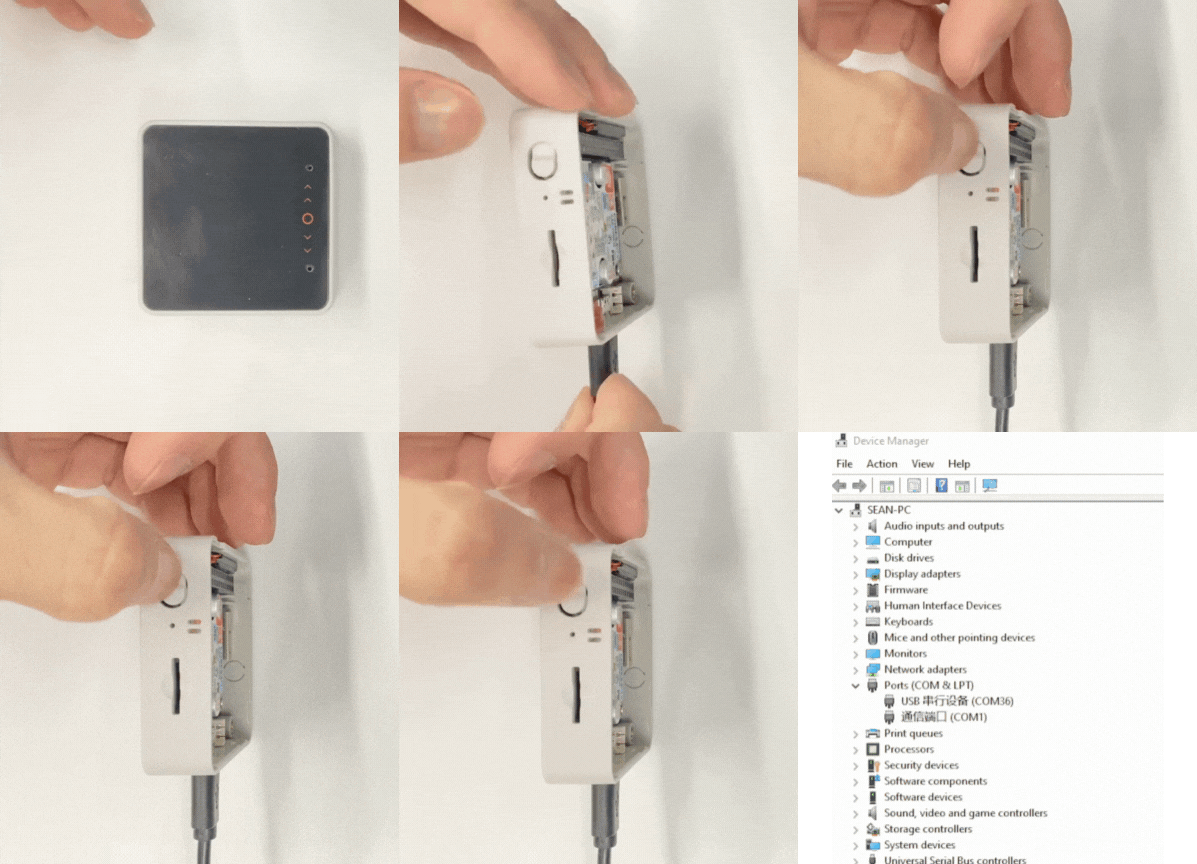
- 1. ダウンロードモードに入る:CoreS3-SEのリセットボタンを長押し(約2秒間)して、内部の緑色LEDが点灯するまで押し続け、その後ボタンを離します。デバイスはダウンロードモードに入り、プログラミングを待機しています。 ボタンを離すと緑色 LEDが消灯し、デバイスがダウンロードモードに入ったことを確認できます。
説明
異なるデバイスではプログラムのアップロード前にダウンロードモードに入る必要があり、メインコントローラの種類によってこの手順が異なる場合があります。詳細については、Arduino IDE 入門ガイドページの下部にあるデバイスプログラムダウンロードチュートリアルリストを参照して、具体的な操作方法をご確認ください。
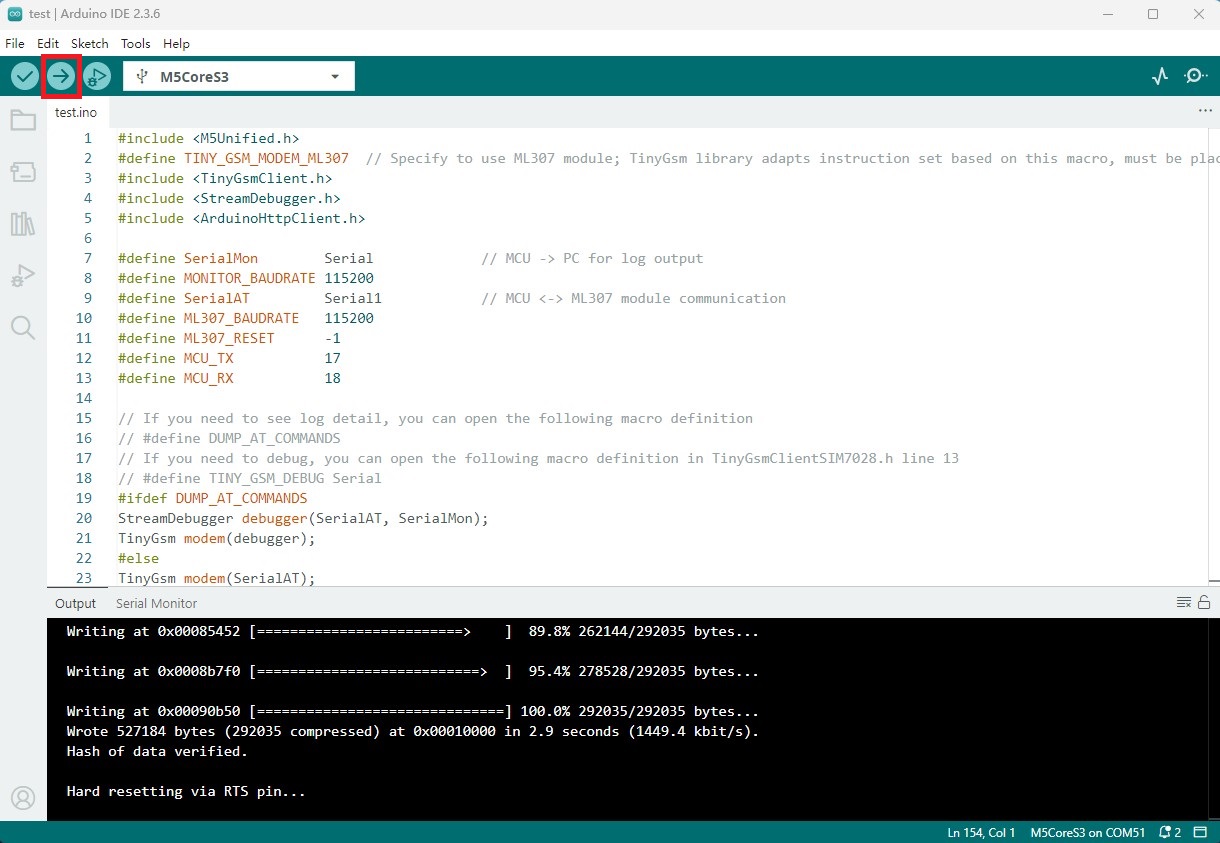
- 2. デバイスポートを選択し、Arduino IDEの左上隅にあるコンパイルおよびアップロードボタンをクリックします。プログラムのコンパイル完了とデバイスへのアップロード完了を待ちます。
5. 例の出力表示
- MQTT通信
デバイスが起動された後、シリアルモニタはネットワークとMQTTサーバへの接続情報を出力します。接続成功後、デバイスは10秒ごとにサーバにメッセージを公開し、同時に購読されたトピックがメッセージを受け取った場合、受け取ったメッセージのコンテンツを出力します。
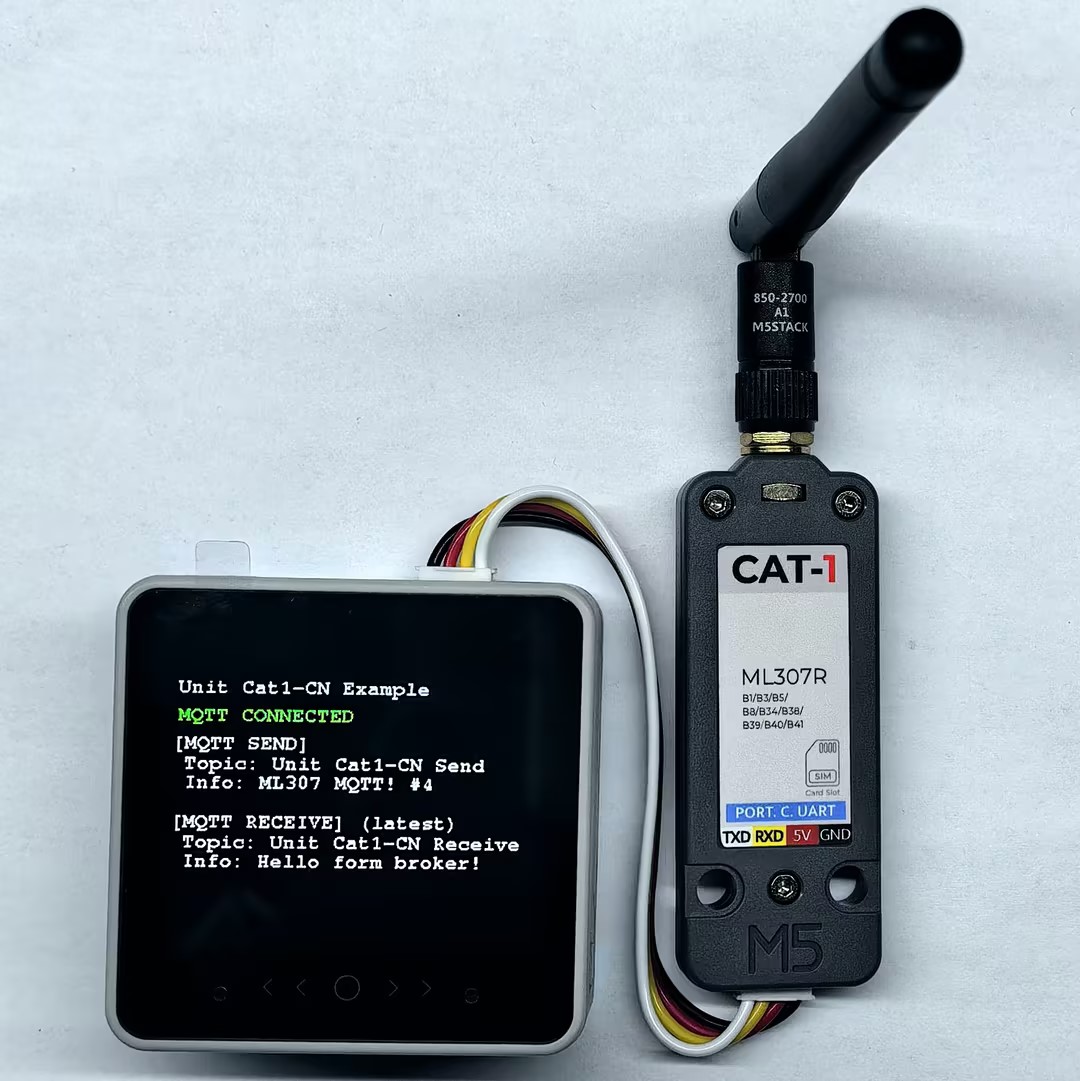
シリアルモニタの反馈は以下の通りです:
>>ML307 MQTT TEST
Initializing modem...
Waiting for network...
success
Waiting for GPRS connect...
success
CCID: 898600B11925F0192677
Signal quality: 31
Device IP address: 10.42.155.4
success
>> Connecting to MQTT broker: mqtt.m5stack.com
>> MQTT CONNECTED, subscribing: Unit Cat1-CN Receive
=== MQTT CONNECTED ===
>> [MQTT SEND] Topic: Unit Cat1-CN Send
Info: ML307 MQTT! #0
......
>> [MQTT RECEIVE] Topic: Unit Cat1-CN Receive
Info: Hello from MQTT Broker- HTTP通信
デバイスが起動された後、シリアルモニタはネットワーク接続情報を出力します。接続成功後、デバイスは指定されたサーバへHTTP GETリクエストを送信し、返されたステータスコード、レスポンスヘッダ、およびレスポンスボディのコンテンツを出力します。
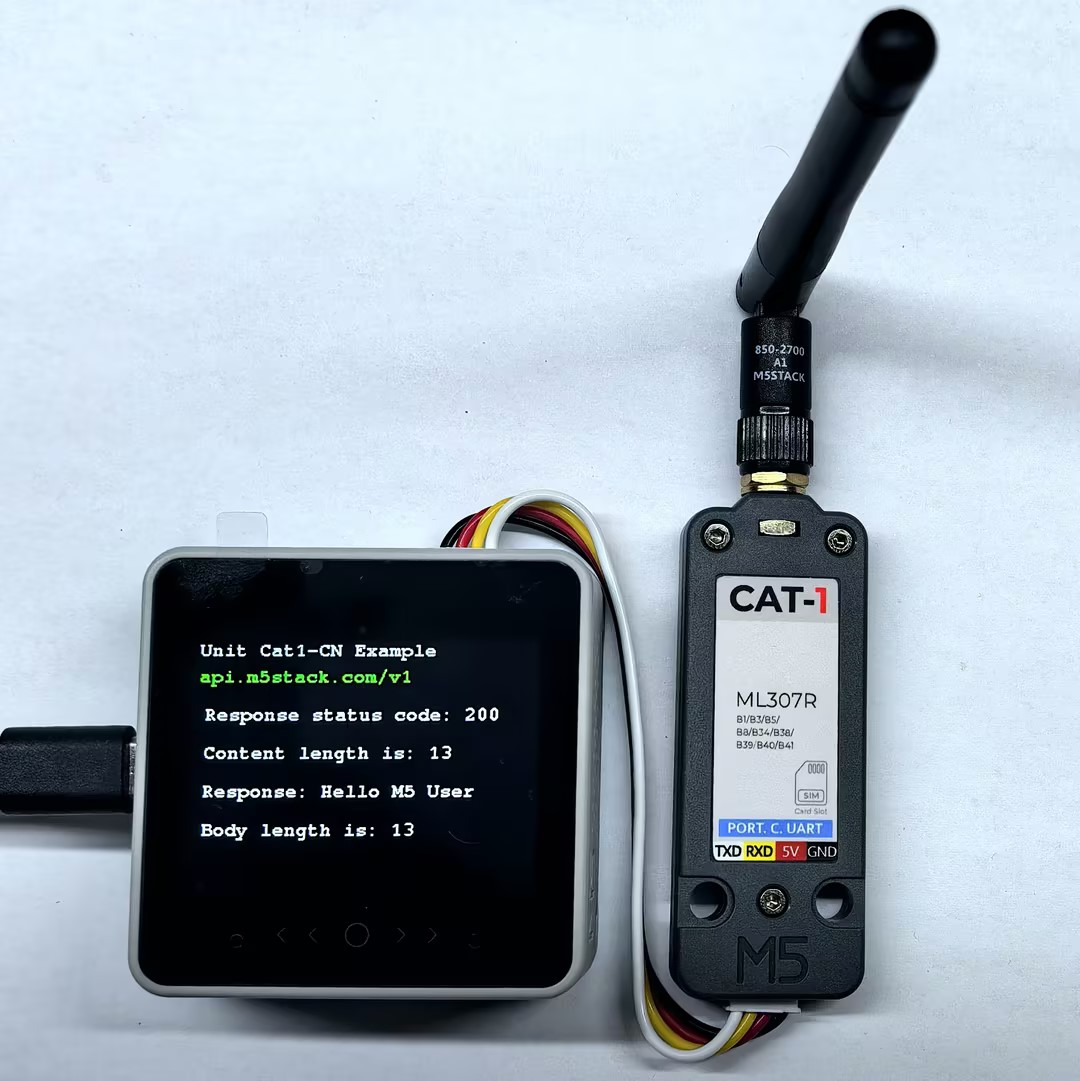
シリアルモニタの反馈は以下の通りです:
Performing HTTP GET request... Response status code: 200
Response Headers:
    Server : nginx/1.14.0 (Ubuntu)
    Date : Tue, 25 Nov 2025 07:27:26 GMT
    Content-Type : text/plain;charset=UTF-8
    Content-Length : 13
    Connection : close
    Vary : Origin
    Vary : Access-Control-Request-Method
    Vary : Access-Control-Request-Headers
    X-Content-Type-Options : nosniff
    X-XSS-Protection : 1; mode=block
    Cache-Control : no-cache, no-store, max-age=0, must-revalidate
    Pragma : no-cache
    Expires : 0
    X-Frame-Options : DENY
Content length is: 13
Response:
    Hello M5 User
Body length is: 13
Server disconnectedPage Tools