

Arduino入門
2. デバイス&サンプル
3. M5Unified
4. M5GFX
5. 拡張モジュール&サンプル
Unit
Module
Atomic
Tab5
IoT
アクセサリー
Unit DoF10 Arduino チュートリアル
1. 準備
- 環境設定: Arduino IDE はじめにガイド を参照して IDE のインストールを完了し、使用する開発ボードに対応するボードマネージャと必要なドライバライブラリをインストールしてください。
- 使用するドライバライブラリ:
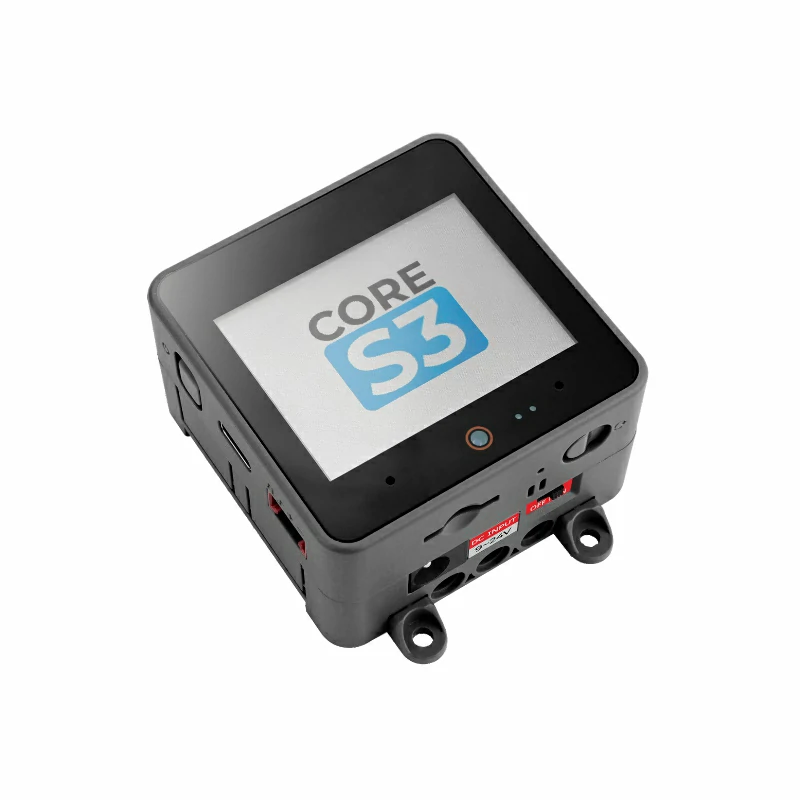
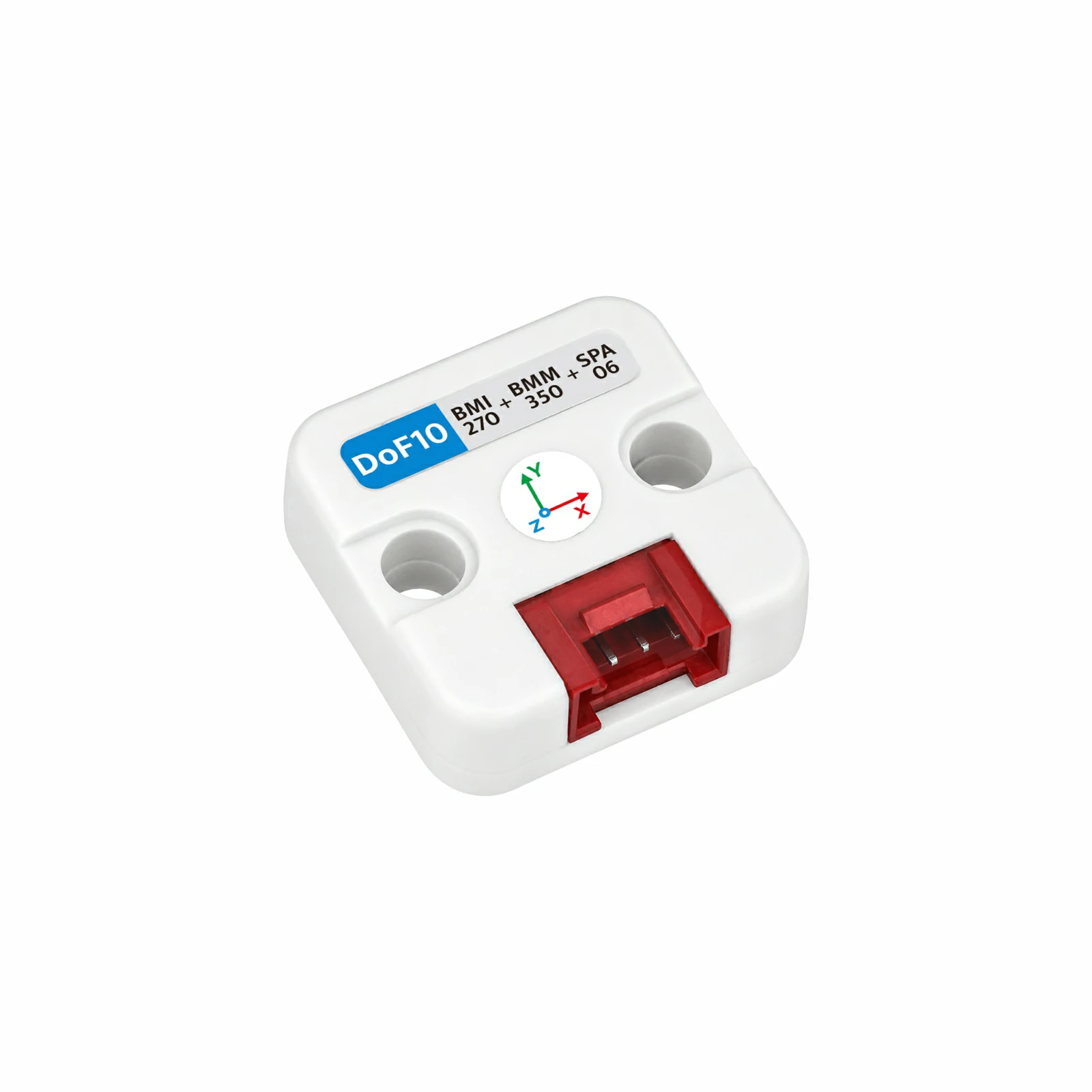
- 使用するハードウェア製品:
2. サンプルプログラム
- このチュートリアルでは、CoreS3 をメインコントローラとして Unit DoF10 と組み合わせて使用します。Unit DoF10 は I2C 通信を使用します。BMI270 のデフォルトアドレスは
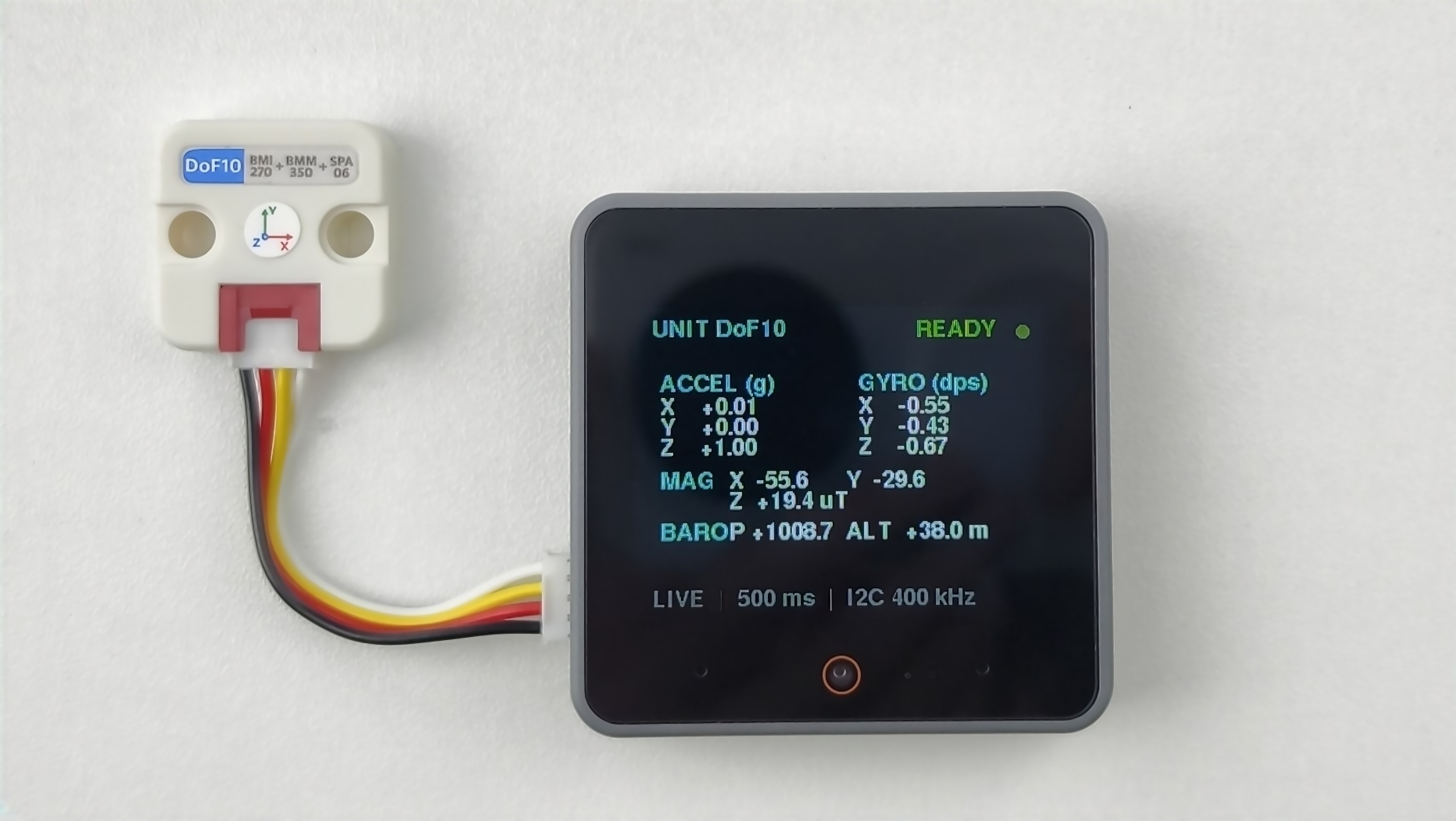
0x69で、オンボードスイッチで0x68に切り替えることができます(切り替え後はプログラム内のBMI270_ADDRESSも変更してください)。BMM350 のアドレスは0x14、SPA06-003 のアドレスは0x76です。デバイス接続後の対応ピンはG2 (SDA)とG1 (SCL)です。サンプルプログラムは 500 ms ごとに BMI270 の 3 軸加速度と 3 軸角速度、BMM350 の 3 軸磁場、SPA06-003 の気圧と温度データを読み取り、CoreS3 の画面に加速度、角速度、磁場、気圧、相対高度を表示し、同じデータをシリアルポートにも出力します。
cpp
1 2 3 4 5 6 7 8 9 10 11 12 13 14 15 16 17 18 19 20 21 22 23 24 25 26 27 28 29 30 31 32 33 34 35 36 37 38 39 40 41 42 43 44 45 46 47 48 49 50 51 52 53 54 55 56 57 58 59 60 61 62 63 64 65 66 67 68 69 70 71 72 73 74 75 76 77 78 79 80 81 82 83 84 85 86 87 88 89 90 91 92 93 94 95 96 97 98 99 100 101 102 103 104 105 106 107 108 109 110 111 112 113 114 115 116 117 118 119 120 121 122 123 124 125 126 127 128 129 130 131 132 133 134 135 136 137 138 139 140 141 142 143 144 145 146 147 148 149 150 151 152 153 154 155 156 157 158 159 160 161 162 163 164 165 166 167 168 169 170 171 172 173 174 175 176 177 178 179 180 181 182 183 184 185 186 187 188 189 190 191
#include <M5Unified.h>
#include <M5UnitUnified.h>
#include <M5UnitUnifiedIMU.h>

constexpr uint8_t BMI270_ADDRESS = 0x69;

m5::unit::UnitUnified units;
m5::unit::UnitDoF10 dof10{BMI270_ADDRESS};
m5::imu::imu_convert_param_t imu_param{};
m5::imu::imu_convert_param_t mag_param{};

constexpr uint16_t COLOR_BG     = TFT_BLACK;
constexpr uint16_t COLOR_CARD   = TFT_BLACK;
constexpr uint16_t COLOR_BORDER = TFT_BLACK;
constexpr uint16_t COLOR_ACCENT = TFT_CYAN;
constexpr uint16_t COLOR_MUTED  = TFT_DARKGREY;
constexpr uint16_t COLOR_GOOD   = 0x5CE0;

void drawHeader(bool connected) {
    M5.Display.fillScreen(COLOR_BG);
    M5.Display.setTextSize(1);
    M5.Display.setTextColor(TFT_CYAN, COLOR_CARD);
    M5.Display.setCursor(12, 7);
    M5.Display.print("UNIT DoF10");
    M5.Display.setTextSize(1);
    M5.Display.setTextColor(connected ? TFT_GREEN : TFT_ORANGE, COLOR_CARD);
    M5.Display.setCursor(220, 8);
    M5.Display.print(connected ? "READY" : "WAIT");
    M5.Display.fillCircle(304, 18, 5, connected ? COLOR_GOOD : TFT_ORANGE);
}

void drawStatus(const char* message, uint16_t color) {
    M5.Display.fillScreen(COLOR_BG);
    drawHeader(false);
    M5.Display.setTextSize(1);
    M5.Display.setTextColor(color, COLOR_BG);
    M5.Display.setCursor(12, 72);
    M5.Display.print(message);
    M5.Display.setTextSize(1);
    M5.Display.setTextColor(COLOR_MUTED, COLOR_BG);
    M5.Display.setCursor(12, 108);
    M5.Display.print("I2C bus / sensor status");
}

void drawVectorCard(int x, int y, const char* title, const char* unit,
                    float x_value, float y_value, float z_value) {
    M5.Display.fillRoundRect(x, y, 148, 68, 8, COLOR_CARD);
    M5.Display.drawRoundRect(x, y, 148, 68, 8, COLOR_BORDER);
    M5.Display.setTextSize(1);
    M5.Display.setTextColor(COLOR_ACCENT, COLOR_CARD);
    M5.Display.setCursor(x + 10, y);
    M5.Display.printf("%s (%s)", title, unit);
    M5.Display.setTextSize(1);
    M5.Display.setTextColor(TFT_WHITE, COLOR_CARD);
    M5.Display.setCursor(x + 10, y + 18);
    M5.Display.printf("X  %+7.2f", x_value);
    M5.Display.setCursor(x + 10, y + 34);
    M5.Display.printf("Y  %+7.2f", y_value);
    M5.Display.setCursor(x + 10, y + 50);
    M5.Display.printf("Z  %+7.2f", z_value);
}

void drawData(float ax, float ay, float az, float gx, float gy, float gz,
              float mx, float my, float mz, float pressure, float altitude) {
    M5.Display.startWrite();
    drawVectorCard(8, 50, "ACCEL", "g", ax, ay, az);
    drawVectorCard(164, 50, "GYRO", "dps", gx, gy, gz);
    M5.Display.fillRect(12, 118, 308, 20, COLOR_BG);
    M5.Display.fillRect(12, 138, 308, 20, COLOR_BG);
    M5.Display.fillRect(12, 158, 308, 24, COLOR_BG);
    M5.Display.setTextSize(1);
    M5.Display.setTextColor(COLOR_ACCENT, COLOR_CARD);
    M5.Display.setCursor(18, 126);
    M5.Display.print("MAG");
    M5.Display.setTextSize(1);
    M5.Display.setTextColor(TFT_WHITE, COLOR_CARD);
    M5.Display.setCursor(72, 126);
    M5.Display.printf("X %+6.1f", mx);
    M5.Display.setCursor(164, 126);
    M5.Display.printf("Y %+6.1f", my);
    M5.Display.setCursor(72, 142);
    M5.Display.printf("Z %+6.1f uT", mz);
    M5.Display.setTextColor(COLOR_ACCENT, COLOR_CARD);
    M5.Display.setCursor(18, 166);
    M5.Display.print("BARO");
    M5.Display.setTextSize(1);
    M5.Display.setTextColor(TFT_WHITE, COLOR_CARD);
    M5.Display.setCursor(72, 166);
    M5.Display.printf("P %+7.1f  ALT %+6.1f m", pressure, altitude);
    M5.Display.setTextColor(COLOR_MUTED, COLOR_BG);
    M5.Display.setCursor(12, 218);
    M5.Display.print("LIVE  |  500 ms  |  I2C 400 kHz");
    M5.Display.endWrite();
}

void setup() {
    Serial.begin(115200);
    const uint32_t serial_start = millis();
    while (!Serial && millis() - serial_start < 3000) {
        delay(10);
    }
    Serial.println("Starting Unit DoF10...");

    auto config = M5.config();
    M5.begin(config);
    M5.Display.setFont(&fonts::FreeSansBold9pt7b);
    M5.Display.setTextSize(1);
    M5.Display.setRotation(1);
    M5.Display.setTextWrap(false, false);
    drawStatus("Initializing...", COLOR_ACCENT);

    auto cfg = dof10.component_config();
    cfg.clock = 400000;
    dof10.component_config(cfg);

    if (!M5.Ex_I2C.begin() || !units.add(dof10, M5.Ex_I2C) || !units.begin()) {
        while (true) {
            Serial.println("Unit DoF10 not found. Check wiring and I2C addresses.");
            drawStatus("Sensor not found", TFT_ORANGE);
            delay(1000);
        }
    }

    dof10.imu().imuConvertParam(imu_param);
    dof10.mag().imuConvertParam(mag_param);
    Serial.printf("Unit DoF10 ready, BMI270 address: 0x%02X\n", BMI270_ADDRESS);
    drawHeader(true);
}

void loop() {
    M5.update();
    units.update();

    static uint32_t last_output = 0;
    if (millis() - last_output < 500) {
        return;
    }
    last_output = millis();

    m5::imu::imu_raw_data_t imu_raw{};
    static bool waiting_shown = false;
    const bool imu_updated = m5::imu::any(dof10.imu().readImuRaw(imu_raw));
    if (imu_updated) {
        Serial.printf("Accel: %.3f, %.3f, %.3f g\n",
                      imu_raw.accel[0] * imu_param.accel_res,
                      imu_raw.accel[1] * imu_param.accel_res,
                      imu_raw.accel[2] * imu_param.accel_res);
        Serial.printf("Gyro:  %.3f, %.3f, %.3f dps\n",
                      imu_raw.gyro[0] * imu_param.gyro_res,
                      imu_raw.gyro[1] * imu_param.gyro_res,
                      imu_raw.gyro[2] * imu_param.gyro_res);
    }

    m5::imu::imu_raw_data_t mag_raw{};
    const bool mag_updated = m5::imu::any(dof10.mag().readImuRaw(mag_raw));
    if (mag_updated) {
        Serial.printf("Mag:   %.2f, %.2f, %.2f uT\n",
                      mag_raw.mag[0] * mag_param.mag_res,
                      mag_raw.mag[1] * mag_param.mag_res,
                      mag_raw.mag[2] * mag_param.mag_res);
    }

    const bool baro_updated = dof10.baro().updated();
    if (baro_updated) {
        Serial.printf("Pressure: %.2f hPa\n", dof10.baro().pressure() / 100.0f);
        Serial.printf("Temperature: %.2f C\n", dof10.baro().temperature());
        Serial.printf("Relative altitude: %.2f m\n\n", dof10.baro().altitude());
    }

    if (imu_updated || mag_updated || baro_updated) {
        waiting_shown = false;
        const float ax = imu_raw.accel[0] * imu_param.accel_res;
        const float ay = imu_raw.accel[1] * imu_param.accel_res;
        const float az = imu_raw.accel[2] * imu_param.accel_res;
        const float gx = imu_raw.gyro[0] * imu_param.gyro_res;
        const float gy = imu_raw.gyro[1] * imu_param.gyro_res;
        const float gz = imu_raw.gyro[2] * imu_param.gyro_res;
        const float mx = mag_raw.mag[0] * mag_param.mag_res;
        const float my = mag_raw.mag[1] * mag_param.mag_res;
        const float mz = mag_raw.mag[2] * mag_param.mag_res;

        drawData(ax, ay, az, gx, gy, gz, mx, my, mz,
                 dof10.baro().pressure() / 100.0f, dof10.baro().altitude());
    } else {
        if (!waiting_shown) {
            waiting_shown = true;
            Serial.println("Waiting for Unit DoF10 data...");
            drawStatus("Waiting for data...", COLOR_ACCENT);
        }
    }
}3. コンパイルと書き込み
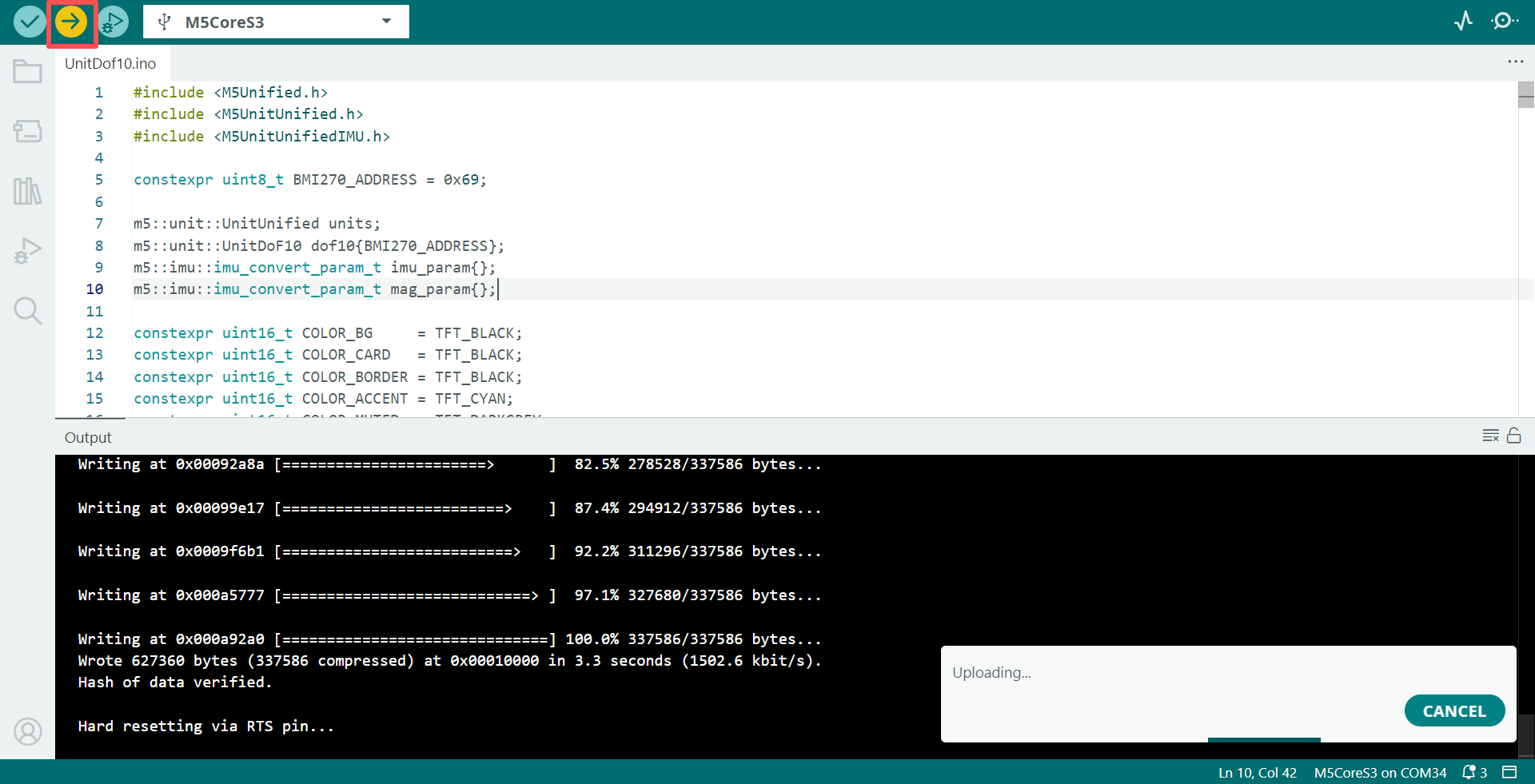
- 上記のサンプルコードをプロジェクトのコードエリアにコピーして貼り付け、デバイスポートを選択します(詳細は プログラムのコンパイルと書き込み を参照してください)。Arduino IDE の左上にあるコンパイルと書き込みボタンをクリックし、プログラムのコンパイルとデバイスへの書き込みが完了するまで待ちます。
4. 姿勢および環境データの読み取り
- プログラムの実行後、画面には 3 軸加速度、3 軸角速度、3 軸磁場、気圧、温度、相対高度データが 500 ms ごとに更新され、シリアルモニタにも対応する値が同時に出力されます。
Page Tools