

Arduino 上手教程
2. 设备开发 & 案例程序
3. M5Unified
4. M5GFX
5. 扩展模块
Unit
Module
Atomic
Tab5
IoT
Module USB v1.2 Arduino 使用教程
1. 准备工作
1. 环境配置:参考 Arduino IDE 上手教程完成 IDE 安装,并根据实际使用的开发板安装对应的板管理器。
2. 使用到的驱动库:
3. 使用到的硬件产品:
- CoreS3
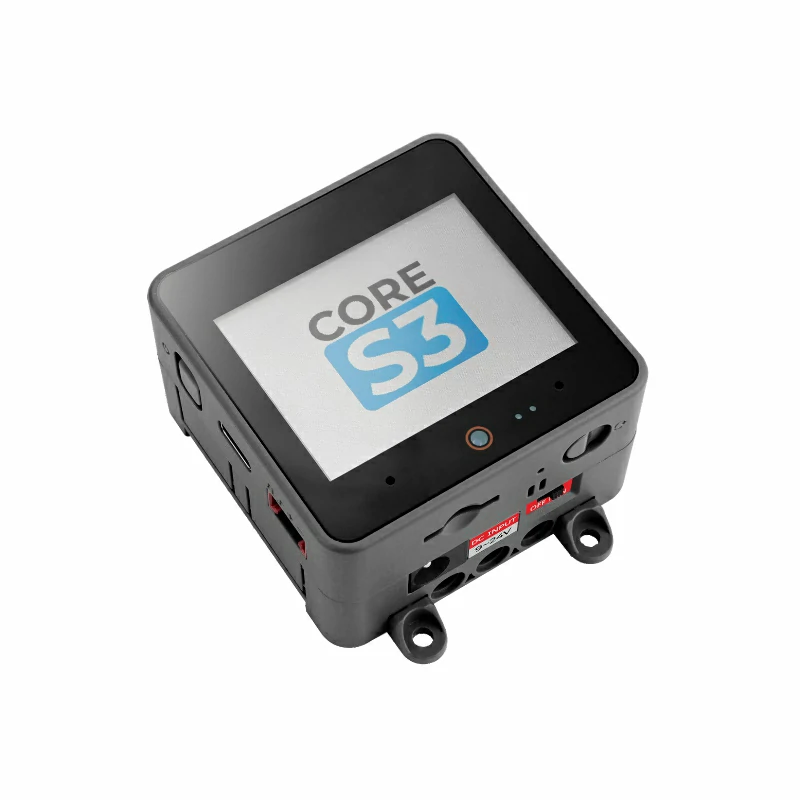
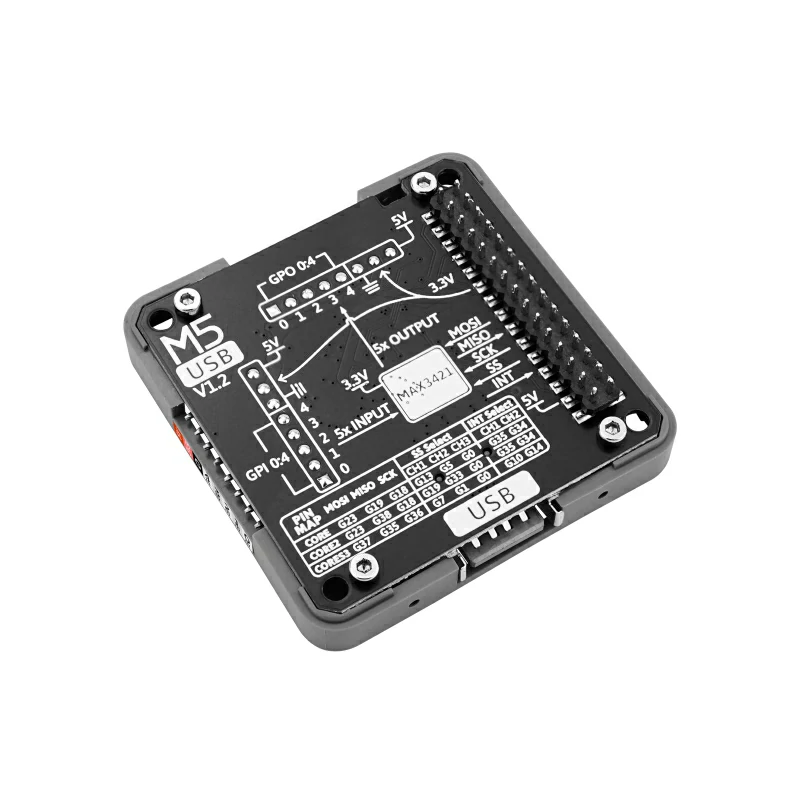
- Module USB v1.2
- USB 鼠标
- USB 键盘
2. 注意事项
引脚兼容性
由于每款主机的引脚配置不同,使用前请参考产品文档中的引脚兼容表,并根据实际引脚连接情况修改案例程序。
3. 案例程序
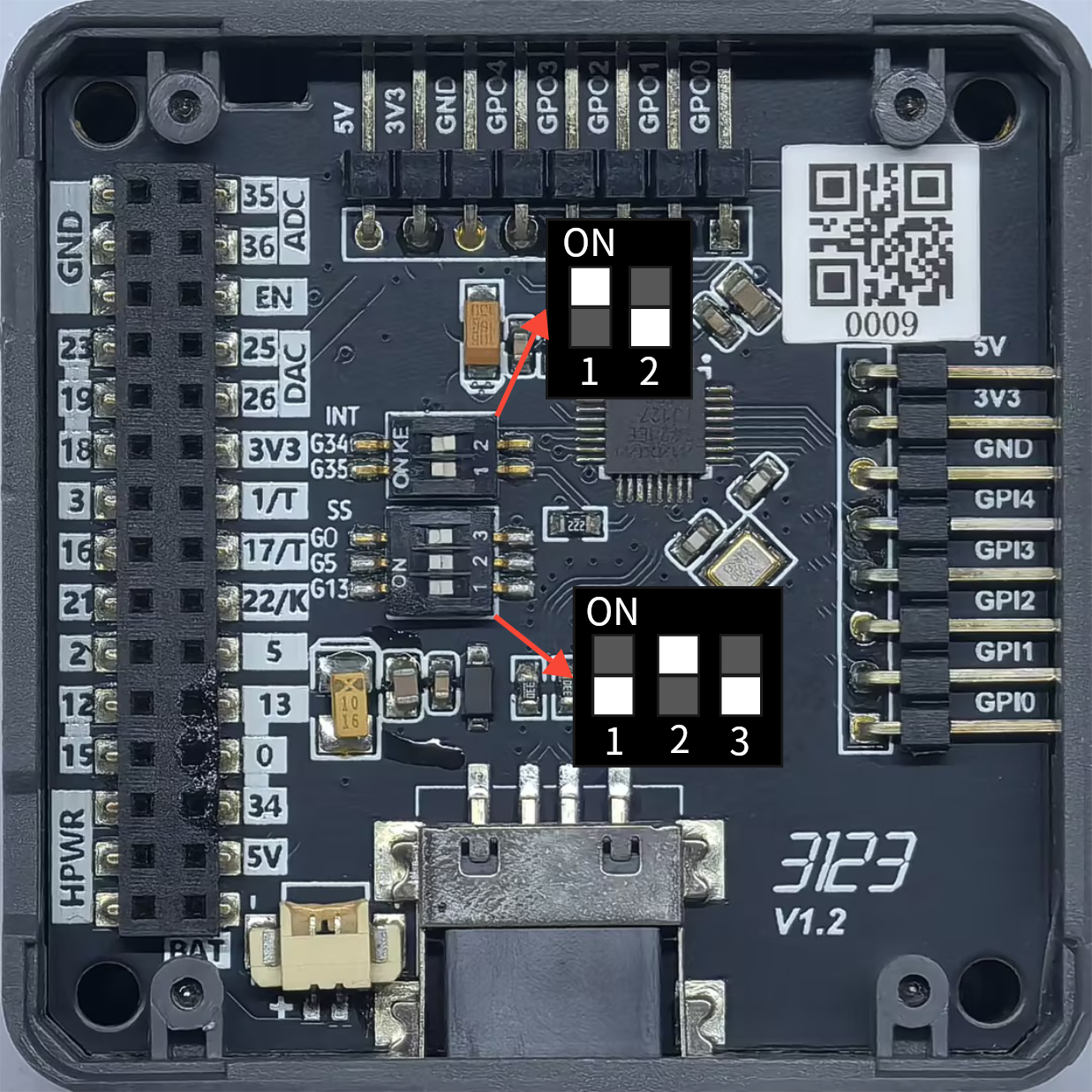
- 本教程中使用的主控设备为 CoreS3,搭配 Module USB v1.2 实现 USB 主机功能。Module USB v1.2 使用 SPI 与主控通信,请根据实际的电路连接修改程序中的引脚定义,设备连接后对应的 SPI IO 为
G36 (SCK)、G37 (MOSI)、G35 (MISO)、G1 (CS)、G10 (INT)。
拨码开关设置如下图所示:
3.1 USB 鼠标
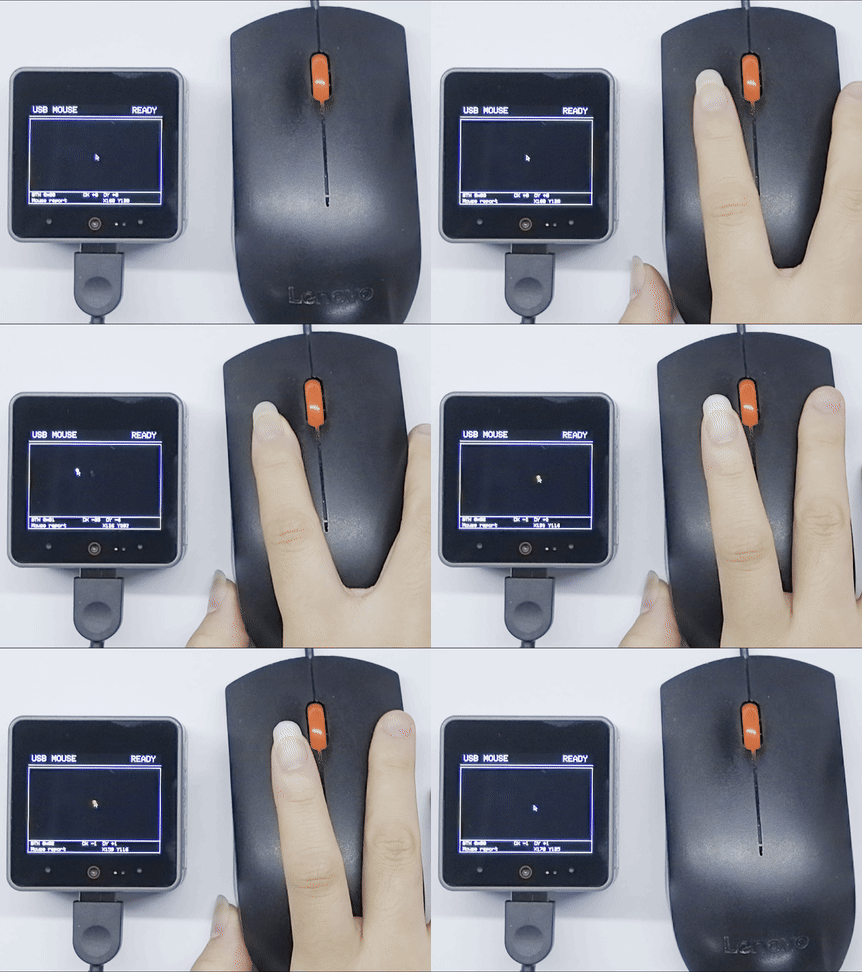
本案例使用 Module USB v1.2 的 MAX3421E 控制器工作在 USB 主机模式。将 USB 鼠标连接到模块的 USB 接口,CoreS3 屏幕顶部显示连接状态,中间显示鼠标活动区域和指针,底部显示按键、位移、坐标和最近状态;移动鼠标、点击鼠标按键时,程序会同步更新界面并在串口输出 HID 报告信息。
cpp
1 2 3 4 5 6 7 8 9 10 11 12 13 14 15 16 17 18 19 20 21 22 23 24 25 26 27 28 29 30 31 32 33 34 35 36 37 38 39 40 41 42 43 44 45 46 47 48 49 50 51 52 53 54 55 56 57 58 59 60 61 62 63 64 65 66 67 68 69 70 71 72 73 74 75 76 77 78 79 80 81 82 83 84 85 86 87 88 89 90 91 92 93 94 95 96 97 98 99 100 101 102 103 104 105 106 107 108 109 110 111 112 113 114 115 116 117 118 119 120 121 122 123 124 125 126 127 128 129 130 131 132 133 134 135 136 137 138 139 140 141 142 143 144 145 146 147 148 149 150 151 152 153 154 155 156 157 158 159 160 161 162 163 164 165 166 167 168 169 170 171 172 173 174 175 176
#include <M5Unified.h>
#include <M5_Max3421E_Usb.h>

// CoreS3: SCK=36, MOSI=37, MISO=35, CS=1, INT=10.
M5_USBH_Host USBHost(&SPI, 36, 37, 35, 1, 10);
M5Canvas mouse_canvas(&M5.Display);

// Track the pointer, button state, last movement, and connection status.
static int cursor_x = 160;
static int cursor_y = 120;
static uint8_t mouse_buttons = 0;
static int8_t mouse_dx = 0;
static int8_t mouse_dy = 0;
static bool mouse_connected = false;
static const char* mouse_status = "WAITING FOR MOUSE";

void drawPointer()
{
    // Draw a small pointer marker inside the activity area.
    mouse_canvas.drawLine(cursor_x, cursor_y, cursor_x, cursor_y + 10, WHITE);
    mouse_canvas.drawLine(cursor_x, cursor_y, cursor_x + 7,
                          cursor_y + 7, WHITE);
    mouse_canvas.drawLine(cursor_x + 4, cursor_y + 7, cursor_x + 7,
                          cursor_y + 7, WHITE);
    mouse_canvas.drawLine(cursor_x + 4, cursor_y + 7, cursor_x,
                          cursor_y + 10, WHITE);
    mouse_canvas.drawLine(cursor_x + 3, cursor_y + 7, cursor_x + 6,
                          cursor_y + 12, WHITE);
}

void renderMouseUI()
{
    // Redraw the complete screen from the current mouse state.
    mouse_canvas.fillSprite(BLACK);
    mouse_canvas.setTextColor(WHITE, BLACK);
    mouse_canvas.setTextSize(2);
    mouse_canvas.setTextWrap(false, false);

    mouse_canvas.setCursor(8, 5);
    mouse_canvas.print("USB MOUSE");
    mouse_canvas.setCursor(248, 5);
    mouse_canvas.print(mouse_connected ? "READY" : "WAIT");
    mouse_canvas.drawLine(0, 28, 319, 28, WHITE);

    // Keep the pointer inside the bordered activity area.
    mouse_canvas.drawRect(0, 34, 319, 204, WHITE);
    drawPointer();
    if (mouse_buttons & 0x01) {
        mouse_canvas.fillCircle(cursor_x, cursor_y, 3, WHITE);
    }
    if (mouse_buttons & 0x02) {
        mouse_canvas.fillCircle(cursor_x, cursor_y, 3, GREEN);
    }

    mouse_canvas.drawLine(0, 209, 319, 209, WHITE);
    mouse_canvas.setTextSize(1.25f);
    mouse_canvas.setCursor(8, 212);
    mouse_canvas.printf("BTN 0x%02X", mouse_buttons);
    mouse_canvas.setCursor(132, 212);
    mouse_canvas.printf("DX %+d  DY %+d", mouse_dx, mouse_dy);
    mouse_canvas.setCursor(8, 226);
    mouse_canvas.printf("%s", mouse_status);
    mouse_canvas.setCursor(180, 226);
    mouse_canvas.printf("X%03d Y%03d", cursor_x, cursor_y);
    mouse_canvas.pushSprite(0, 0);
}

void showMouseStatus(const char* status, uint8_t buttons = 0,
                     int16_t move_x = 0, int16_t move_y = 0)
{
    // Update the values shown in the footer before rendering.
    mouse_status = status;
    mouse_buttons = buttons;
    mouse_dx = move_x;
    mouse_dy = move_y;
    renderMouseUI();
}

void movePointer(int16_t move_x, int16_t move_y)
{
    // Clamp movement so the pointer never overwrites the border.
    cursor_x = constrain(cursor_x + move_x, 8, 308);
    cursor_y = constrain(cursor_y + move_y, 42, 190);
}

void setup()
{
    // Initialize the display, serial port, sprite, and USB host.
    M5.begin();
    Serial.begin(115200);
    mouse_canvas.createSprite(320, 240);
    showMouseStatus("Waiting for mouse...");

    Serial.println("M5Module USB HOST HID");
    if (USBHost.begin(0)) {
        Serial.println("MODULE INIT OK");
        showMouseStatus("USB host ready");
    } else {
        Serial.println("MODULE INIT ERROR");
        showMouseStatus("USB host error");
    }
}

void loop()
{
    // Poll the USB host so HID callbacks can receive reports.
    USBHost.task();
    delay(1);
}

void tuh_hid_report_sent_cb(uint8_t dev_addr, uint8_t instance,
                            uint8_t const* report, uint16_t len)
{
    // This host example does not send HID reports.
    (void)dev_addr;
    (void)instance;
    (void)report;
    (void)len;
}

// Invoked when a USB HID device is connected.
void tuh_hid_mount_cb(uint8_t dev_addr, uint8_t instance,
                      uint8_t const* desc_report, uint16_t desc_len)
{
    (void)desc_report;
    (void)desc_len;

    uint16_t vid;
    uint16_t pid;
    tuh_vid_pid_get(dev_addr, &vid, &pid);
    Serial.printf("HID mounted: address=%d, instance=%d, VID=%04X, PID=%04X\r\n",
                  dev_addr, instance, vid, pid);
    mouse_connected = true;
    showMouseStatus("Mouse connected");

    if (!tuh_hid_receive_report(dev_addr, instance)) {
        Serial.println("Cannot request HID report");
    }
}

// Invoked when a USB HID device is disconnected.
void tuh_hid_umount_cb(uint8_t dev_addr, uint8_t instance)
{
    Serial.printf("HID unmounted: address=%d, instance=%d\r\n",
                  dev_addr, instance);
    mouse_connected = false;
    showMouseStatus("Mouse disconnected");
}

// Invoked when a HID report is received from the interrupt endpoint.
void tuh_hid_report_received_cb(uint8_t dev_addr, uint8_t instance,
                                uint8_t const* report, uint16_t len)
{
    if (len >= 3) {
        // A boot mouse report starts with buttons, X movement, and Y movement.
        // Button bits are left=0x01, right=0x02, and middle=0x04.
        const uint8_t buttons = report[0];
        const int8_t move_x = static_cast<int8_t>(report[1]);
        const int8_t move_y = static_cast<int8_t>(report[2]);

        movePointer(move_x, move_y);
        showMouseStatus("Mouse report", buttons, move_x, move_y);
        Serial.printf("HID report: buttons=0x%02X, dx=%d, dy=%d\r\n",
                      buttons, move_x, move_y);

        // Use the middle button to clear the canvas.
        if (buttons & 0x04) {
            mouse_canvas.fillSprite(BLACK);
            mouse_canvas.pushSprite(0, 0);
        }
    }

    if (!tuh_hid_receive_report(dev_addr, instance)) {
        Serial.println("Cannot request next HID report");
    }
}程序启动并成功初始化模块后,CoreS3 屏幕会显示 USB 主机和外设状态,串口监视器会输出类似信息:
M5Module USB HOST HID
MODULE INIT OK
HID mounted: address=1, instance=0, VID=XXXX, PID=XXXX
HID report: buttons=0x00, dx=1, dy=0移动鼠标时,CoreS3 屏幕上的指针会随之移动;按下鼠标左键或右键时,指针位置会分别绘制白色或绿色标记,按下中键会清空屏幕。
3.2 USB 键盘
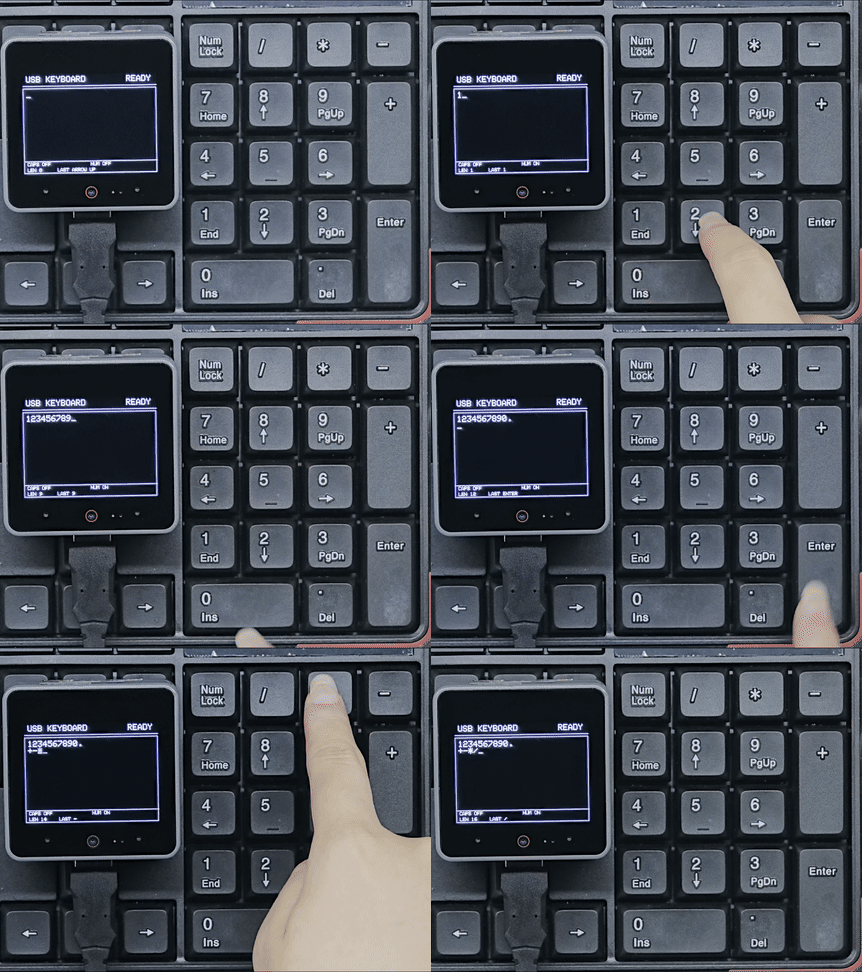
本案例使用 Module USB v1.2 的 MAX3421E 控制器工作在 USB 主机模式。连接 USB 键盘后,CoreS3 屏幕显示黑底白字的输入内容、光标和键盘状态,串口输出 HID 报告及解析后的字符。
cpp
1 2 3 4 5 6 7 8 9 10 11 12 13 14 15 16 17 18 19 20 21 22 23 24 25 26 27 28 29 30 31 32 33 34 35 36 37 38 39 40 41 42 43 44 45 46 47 48 49 50 51 52 53 54 55 56 57 58 59 60 61 62 63 64 65 66 67 68 69 70 71 72 73 74 75 76 77 78 79 80 81 82 83 84 85 86 87 88 89 90 91 92 93 94 95 96 97 98 99 100 101 102 103 104 105 106 107 108 109 110 111 112 113 114 115 116 117 118 119 120 121 122 123 124 125 126 127 128 129 130 131 132 133 134 135 136 137 138 139 140 141 142 143 144 145 146 147 148 149 150 151 152 153 154 155 156 157 158 159 160 161 162 163 164 165 166 167 168 169 170 171 172 173 174 175 176 177 178 179 180 181 182 183 184 185 186 187 188 189 190 191 192 193 194 195 196 197 198 199 200 201 202 203 204 205 206 207 208 209 210 211 212 213 214 215 216 217 218 219 220 221 222 223 224 225 226 227 228 229 230 231 232 233 234 235 236 237 238 239 240 241 242 243 244 245 246 247 248 249 250 251 252 253 254 255 256 257 258 259 260 261 262 263 264 265 266 267 268 269 270 271 272 273 274 275 276 277 278 279 280 281 282 283 284 285 286 287 288 289 290 291 292 293 294 295 296 297 298 299 300 301 302 303 304 305 306 307 308 309 310 311 312 313 314 315 316 317 318 319 320 321 322 323 324 325 326 327 328 329 330 331 332 333 334 335 336 337 338 339 340 341 342 343 344 345 346 347 348 349 350 351 352 353 354 355 356 357 358 359 360 361 362 363 364 365 366 367 368 369 370 371 372 373 374 375 376 377 378 379 380 381 382 383 384 385 386 387 388 389 390 391 392 393 394 395 396 397 398 399 400 401 402 403 404 405 406 407 408 409 410 411 412 413 414 415 416 417 418 419 420 421 422 423 424 425 426 427 428 429 430 431 432 433 434 435 436 437 438 439 440 441 442 443 444 445 446 447 448 449 450 451 452 453 454 455 456 457 458 459 460 461 462 463 464 465 466 467 468 469 470 471 472 473 474 475 476 477 478
#include <M5Unified.h>
#include <M5_Max3421E_Usb.h>

// CoreS3: SCK=36, MOSI=37, MISO=35, CS=1, INT=10.
M5_USBH_Host USBHost(&SPI, 36, 37, 35, 1, 10);
M5Canvas canvas(&M5.Display);

// Store text editing state and the current keyboard status.
String typed_text;
String last_key = "--";
uint8_t previous_keys[6] = {0};
bool caps_lock = false;
bool num_lock = false;
bool keyboard_connected = false;
uint16_t cursor_position = 0;

static constexpr uint16_t MAX_TEXT_LENGTH = 240;
static constexpr uint16_t MAX_LAYOUT_LINES = MAX_TEXT_LENGTH + 1;
static constexpr int16_t INPUT_LEFT = 8;
static constexpr int16_t INPUT_TOP = 42;
static constexpr int16_t INPUT_RIGHT = 312;
static constexpr int16_t INPUT_LINE_HEIGHT = 16;
static constexpr uint8_t INPUT_MAX_LINES = 10;

// Each entry stores the character range displayed on one visual line.
struct InputLine {
    uint16_t start;
    uint16_t end;
};

InputLine input_lines[MAX_LAYOUT_LINES];
uint16_t input_line_count = 1;

bool isNewKey(uint8_t key)
{
    // Process a key only once while it remains pressed.
    for (uint8_t previous : previous_keys)
        if (previous == key) return false;
    return true;
}

char keyToAscii(uint8_t key, bool shifted)
{
    // Convert standard HID keyboard usages to printable characters.
    if (key >= 0x04 && key <= 0x1D) {
        char value = 'a' + key - 0x04;
        if (shifted != caps_lock) {
            value = value - 'a' + 'A';
        }
        return value;
    }

    if (key >= 0x1E && key <= 0x27) {
        static const char normal[] = "1234567890";
        static const char shifted_values[] = "!@#$%^&*()";
        return shifted ? shifted_values[key - 0x1E] : normal[key - 0x1E];
    }

    if (key == 0x2C) return ' ';
    if (key >= 0x2D && key <= 0x38) {
        static const char normal[] = "-=[]\\\0;'\x60,./";
        static const char shifted_values[] = "_+{}|\0:\"~<>?";
        return (shifted ? shifted_values : normal)[key - 0x2D];
    }
    return key >= 0x54 && key <= 0x57 ? "/*-+"[key - 0x54] : 0;
}

char keypadToAscii(uint8_t key)
{
    // Convert keypad number keys only when NumLock is active.
    if (!num_lock) return 0;
    if (key >= 0x59 && key <= 0x61) return '1' + key - 0x59;
    return key == 0x62 ? '0' : key == 0x63 ? '.' : 0;
}

void limitTextLength()
{
    // Keep the buffer bounded and keep the cursor within the buffer.
    if (typed_text.length() > MAX_TEXT_LENGTH) {
        const uint16_t removed =
            typed_text.length() - MAX_TEXT_LENGTH;
        typed_text.remove(0, removed);
        if (cursor_position >= removed) {
            cursor_position -= removed;
        } else {
            cursor_position = 0;
        }
    }
    if (cursor_position > typed_text.length()) {
        cursor_position = typed_text.length();
    }
}

void insertText(const String& value)
{
    // Insert text at the cursor instead of replacing the whole buffer.
    String updated = typed_text.substring(0, cursor_position);
    updated += value;
    updated += typed_text.substring(cursor_position);
    typed_text = updated;
    cursor_position += value.length();
    limitTextLength();
}

void buildInputLayout()
{
    // Rebuild visual lines for explicit newlines and automatic wrapping.
    canvas.setTextSize(2);
    const int32_t text_width = INPUT_RIGHT - INPUT_LEFT - canvas.textWidth("_");
    const uint16_t length = typed_text.length();
    String current_line;

    input_line_count = 1;
    input_lines[0] = {0, 0};

    for (uint16_t i = 0; i < length; ++i) {
        const char value = typed_text[i];
        if (value == '\n') {
            input_lines[input_line_count - 1].end = i;
            if (input_line_count < MAX_LAYOUT_LINES) {
                input_lines[input_line_count++] = {i + 1, i + 1};
            }
            current_line = "";
            continue;
        }

        String candidate = current_line;
        candidate += value;
        if (current_line.length() > 0 &&
            canvas.textWidth(candidate) > text_width) {
            input_lines[input_line_count - 1].end = i;
            if (input_line_count < MAX_LAYOUT_LINES) {
                input_lines[input_line_count++] = {i, i};
            }
            current_line = "";
        }

        current_line += value;
        input_lines[input_line_count - 1].end = i + 1;
    }
}

uint16_t cursorLine()
{
    // Find the visual line containing the current insertion point.
    uint16_t cursor_line = 0;
    for (uint16_t i = 0; i < input_line_count; ++i) {
        if (cursor_position < input_lines[i].start) {
            break;
        }
        cursor_line = i;
        if (cursor_position < input_lines[i].end ||
            cursor_position == input_lines[i].start) {
            break;
        }
    }
    return cursor_line;
}

void moveCursorVertical(int8_t direction)
{
    // Preserve the column when moving between visual lines.
    buildInputLayout();

    const uint16_t current_line = cursorLine();
    int16_t target_line = static_cast<int16_t>(current_line) + direction;
    if (target_line < 0 ||
        target_line >= static_cast<int16_t>(input_line_count)) {
        return;
    }

    const uint16_t column = cursor_position -
                            input_lines[current_line].start;
    const uint16_t target_length =
        input_lines[target_line].end - input_lines[target_line].start;
    cursor_position = input_lines[target_line].start +
                      (column < target_length ? column : target_length);
}

void moveCursorToLineEdge(bool end)
{
    // Move to the beginning or end of the current visual line.
    buildInputLayout();
    const uint16_t current_line = cursorLine();
    cursor_position = end ? input_lines[current_line].end
                          : input_lines[current_line].start;
}

void logSpecialKey(const char* name)
{
    last_key = name;
    Serial.printf("Character: [%s]\r\n", name);
}

enum NavAction : uint8_t {
    NAV_LOG, NAV_HOME, NAV_PAGE_UP, NAV_DELETE, NAV_END, NAV_PAGE_DOWN,
    NAV_RIGHT, NAV_LEFT, NAV_DOWN, NAV_UP
};

struct NavKey {
    uint8_t key;
    const char* name;
    NavAction action;
};

static const NavKey nav_keys[] = {
    // Map navigation usages, including the numeric keypad alternatives.
    {0x49, "INSERT", NAV_LOG}, {0x4A, "HOME", NAV_HOME},
    {0x4B, "PAGE UP", NAV_PAGE_UP}, {0x4C, "DELETE", NAV_DELETE},
    {0x4D, "END", NAV_END}, {0x4E, "PAGE DOWN", NAV_PAGE_DOWN},
    {0x4F, "ARROW RIGHT", NAV_RIGHT}, {0x50, "ARROW LEFT", NAV_LEFT},
    {0x51, "ARROW DOWN", NAV_DOWN}, {0x52, "ARROW UP", NAV_UP},
    {0x59, "KEYPAD END", NAV_END}, {0x5A, "KEYPAD DOWN", NAV_DOWN},
    {0x5B, "KEYPAD PAGE DOWN", NAV_PAGE_DOWN},
    {0x5C, "KEYPAD LEFT", NAV_LEFT}, {0x5E, "KEYPAD RIGHT", NAV_RIGHT},
    {0x5F, "KEYPAD HOME", NAV_HOME}, {0x60, "KEYPAD UP", NAV_UP},
    {0x61, "KEYPAD PAGE UP", NAV_PAGE_UP},
    {0x62, "KEYPAD INSERT", NAV_LOG},
    {0x63, "KEYPAD DELETE", NAV_DELETE}
};

bool handleNavigationKey(uint8_t key)
{
    // NumLock changes keypad navigation keys into numeric input.
    if (key >= 0x59 && key <= 0x63 && num_lock) {
        return false;
    }

    const NavKey* nav = nullptr;
    for (const NavKey& item : nav_keys) {
        if (item.key == key) {
            nav = &item;
            break;
        }
    }
    if (nav == nullptr) return false;

    switch (nav->action) {
    case NAV_HOME: moveCursorToLineEdge(false); break;
    case NAV_PAGE_UP: moveCursorVertical(-INPUT_MAX_LINES); break;
    case NAV_DELETE:
        if (cursor_position < typed_text.length()) {
            typed_text.remove(cursor_position, 1);
        }
        break;
    case NAV_END: moveCursorToLineEdge(true); break;
    case NAV_PAGE_DOWN: moveCursorVertical(INPUT_MAX_LINES); break;
    case NAV_RIGHT:
        if (cursor_position < typed_text.length()) ++cursor_position;
        break;
    case NAV_LEFT:
        if (cursor_position > 0) --cursor_position;
        break;
    case NAV_DOWN: moveCursorVertical(1); break;
    case NAV_UP: moveCursorVertical(-1); break;
    default: break;
    }
    logSpecialKey(nav->name);
    return true;
}

void renderTypedText()
{
    // Draw the editor, status indicators, and cursor in one frame.
    limitTextLength();

    canvas.fillSprite(BLACK);
    canvas.setTextColor(WHITE, BLACK);
    canvas.setTextSize(2);
    canvas.setTextWrap(false, false);

    canvas.setCursor(8, 5);
    canvas.print("USB KEYBOARD");
    canvas.setCursor(248, 5);
    canvas.print(keyboard_connected ? "READY" : "WAIT");
    canvas.drawLine(0, 28, 319, 28, WHITE);

    canvas.drawRect(0, 34, 319, 204, WHITE);

    // Keep wrapping inside the input box and keep the cursor visible.
    buildInputLayout();
    const uint16_t cursor_line = cursorLine();

    uint16_t first_line = 0;
    if (input_line_count > INPUT_MAX_LINES) {
        first_line = input_line_count - INPUT_MAX_LINES;
        if (cursor_line < first_line) {
            first_line = cursor_line;
        } else if (cursor_line >= first_line + INPUT_MAX_LINES) {
            first_line = cursor_line - INPUT_MAX_LINES + 1;
        }
    }

    canvas.setClipRect(4, 38, 312, 165);
    for (uint16_t i = first_line;
         i < input_line_count && i < first_line + INPUT_MAX_LINES; ++i) {
        canvas.setCursor(INPUT_LEFT,
                         INPUT_TOP + (i - first_line) * INPUT_LINE_HEIGHT);
        canvas.print(typed_text.substring(input_lines[i].start,
                                          input_lines[i].end));
    }

    const String cursor_prefix =
        typed_text.substring(input_lines[cursor_line].start, cursor_position);
    canvas.setCursor(
        INPUT_LEFT + canvas.textWidth(cursor_prefix),
        INPUT_TOP + (cursor_line - first_line) * INPUT_LINE_HEIGHT);
    canvas.print("_");
    canvas.clearClipRect();

    canvas.drawLine(0, 209, 319, 209, WHITE);
    canvas.setTextWrap(false, false);
    canvas.setTextSize(1.25f);
    canvas.setCursor(8, 212);
    canvas.printf("CAPS %s", caps_lock ? "ON" : "OFF");
    canvas.setCursor(160, 212);
    canvas.printf("NUM %s", num_lock ? "ON" : "OFF");
    canvas.setCursor(8, 226);
    canvas.printf("LEN %u", static_cast<unsigned>(typed_text.length()));
    canvas.setCursor(80, 226);
    canvas.printf("LAST %s", last_key.c_str());

    canvas.pushSprite(0, 0);
}

void appendKeyboardReport(uint8_t const* report, uint16_t len)
{
    // Parse the standard 8-byte boot keyboard report.
    // Byte 0 holds modifiers; bytes 2-7 hold up to six key usages.
    if (len < 8) {
        return;
    }

    // Left/right Shift bits are 0x02 and 0x20 in the modifier byte.
    const bool shifted = (report[0] & 0x22) != 0;
    for (uint8_t i = 2; i < 8; ++i) {
        const uint8_t key = report[i];
        if (key == 0 || !isNewKey(key)) {
            continue;
        }

        // Toggle lock keys, handle navigation, then insert printable text.
        if (key == 0x39) {
            caps_lock = !caps_lock;
            last_key = caps_lock ? "CAPS ON" : "CAPS OFF";
            Serial.printf("Character: [CAPS LOCK %s]\r\n",
                          caps_lock ? "ON" : "OFF");
        } else if (key == 0x53) {
            num_lock = !num_lock;
            last_key = num_lock ? "NUM ON" : "NUM OFF";
            Serial.printf("Character: [NUM LOCK %s]\r\n",
                          num_lock ? "ON" : "OFF");
        } else if (handleNavigationKey(key)) {
        } else if (key == 0x28 || key == 0x58) {
            insertText("\n");
            logSpecialKey("ENTER");
        } else if (key == 0x2A) {
            if (cursor_position > 0) {
                typed_text.remove(cursor_position - 1, 1);
                --cursor_position;
            }
            logSpecialKey("BACKSPACE");
        } else if (key == 0x2B) {
            insertText("    ");
            logSpecialKey("TAB");
        } else {
            char value = keyToAscii(key, shifted);
            if (value == 0) {
                value = keypadToAscii(key);
            }
            if (value != 0) {
                String insertion;
                insertion += value;
                insertText(insertion);
                last_key = String(value);
                Serial.printf("Character: '%c' (HID usage: 0x%02X)\r\n",
                              value, key);
            }
        }
    }

    // Save this report so held keys are ignored on the next report.
    for (uint8_t i = 0; i < 6; ++i) {
        previous_keys[i] = report[i + 2];
    }
    renderTypedText();
}

void setup()
{
    // Initialize the display, editor state, serial port, and USB host.
    M5.begin();
    Serial.begin(115200);

    canvas.createSprite(320, 240);
    typed_text = "";
    last_key = "START";
    num_lock = false;
    keyboard_connected = false;
    cursor_position = 0;
    renderTypedText();

    Serial.println("M5Module USB HOST Keyboard");
    if (USBHost.begin(0)) {
        Serial.println("MODULE INIT OK");
        last_key = "HOST READY";
        renderTypedText();
    } else {
        Serial.println("MODULE INIT ERROR");
        last_key = "HOST ERROR";
        renderTypedText();
    }
}

void loop()
{
    // Poll the USB host so keyboard reports reach the HID callback.
    USBHost.task();
    delay(1);
}

void tuh_hid_mount_cb(uint8_t dev_addr, uint8_t instance,
                      uint8_t const* desc_report, uint16_t desc_len)
{
    // Start requesting reports after a keyboard is connected.
    (void)desc_report;
    (void)desc_len;

    uint16_t vid;
    uint16_t pid;
    tuh_vid_pid_get(dev_addr, &vid, &pid);
    Serial.printf("HID mounted: address=%d, instance=%d, VID=%04X, PID=%04X\r\n",
                  dev_addr, instance, vid, pid);
    keyboard_connected = true;
    last_key = "CONNECTED";
    renderTypedText();

    if (!tuh_hid_receive_report(dev_addr, instance)) {
        Serial.println("Cannot request HID report");
    }
}

void tuh_hid_umount_cb(uint8_t dev_addr, uint8_t instance)
{
    // Update the screen when the keyboard is disconnected.
    Serial.printf("HID unmounted: address=%d, instance=%d\r\n",
                  dev_addr, instance);
    keyboard_connected = false;
    last_key = "DISCONNECTED";
    renderTypedText();
}

void tuh_hid_report_received_cb(uint8_t dev_addr, uint8_t instance,
                                uint8_t const* report, uint16_t len)
{
    // Print both the raw report and the decoded key information.
    Serial.print("Keyboard report: ");
    for (uint16_t i = 0; i < len; ++i) {
        Serial.printf("0x%02X ", report[i]);
    }
    Serial.println();

    appendKeyboardReport(report, len);

    if (len >= 8) {
        Serial.printf("Modifiers: 0x%02X, Keys:", report[0]);
        for (uint8_t i = 2; i < 8; ++i) {
            if (report[i] != 0) {
                Serial.printf(" 0x%02X", report[i]);
            }
        }
        Serial.println();
    }

    if (!tuh_hid_receive_report(dev_addr, instance)) {
        Serial.println("Cannot request next HID report");
    }
}程序启动并成功初始化模块后,CoreS3 屏幕会显示 USB 主机和键盘状态,串口监视器会输出类似信息:
M5Module USB HOST Keyboard
MODULE INIT OK
HID mounted: address=1, instance=0, VID=XXXX, PID=XXXX
Keyboard report: 0x00 0x00 0x04 0x00 0x00 0x00 0x00 0x00
Character: 'a' (HID usage: 0x04)
Modifiers: 0x00, Keys: 0x04输入字符或使用编辑、导航按键时,CoreS3 屏幕上的文本和光标会同步更新,底部显示键盘状态和最近一次按键,串口输出 HID 报告及解析后的字符。
4. 编译上传
- 1. 进入下载模式:CoreS3 长按复位按键 (大约 2 秒) 直到内部绿色 LED 灯亮起后松开按键。松开后绿色 LED 灯熄灭,表示设备已进入下载模式,等待烧录。
说明
不同设备进行程序烧录前需要进入下载模式,不同的主控设备该步骤可能有所不同。详情可参考 Arduino IDE上手教程页面底部的设备程序下载教程列表,查看具体的操作方式。
.gif)
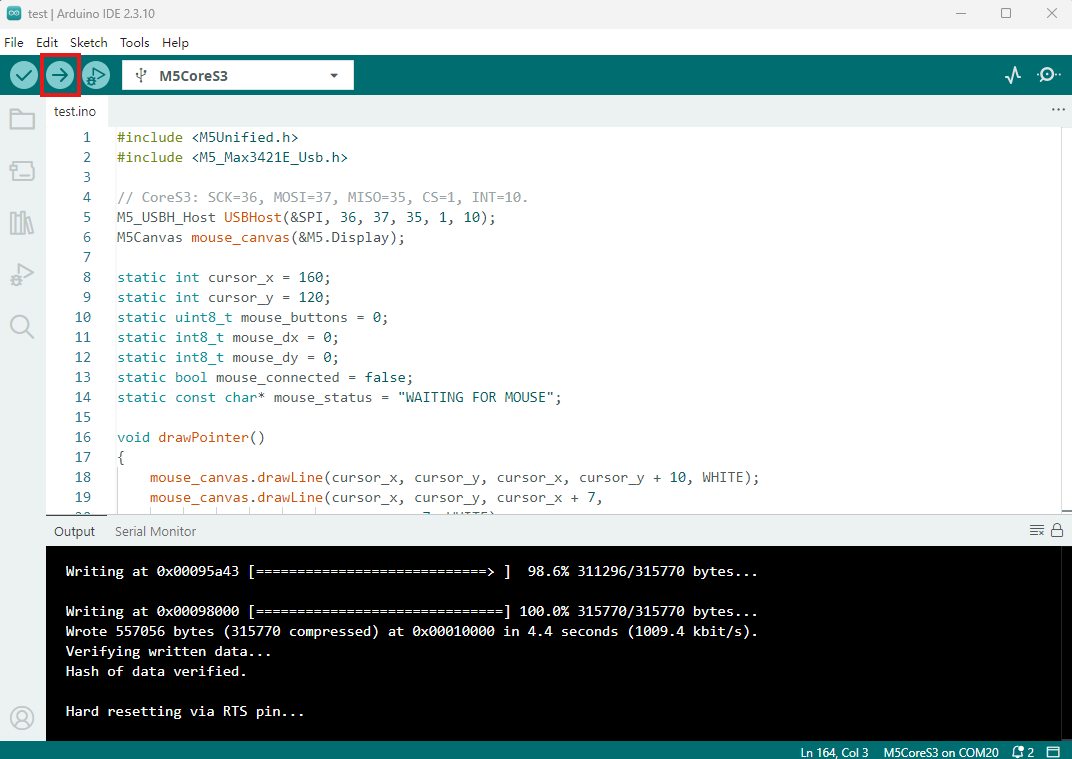
- 2. 选中设备端口,点击 Arduino IDE 左上角编译上传按钮,等待程序完成编译并上传至设备。
Page Tools