

Arduino Quick Start
2. Devices & Examples
3. M5Unified
4. M5GFX
5. Extensions
Unit
Module
Atomic
Tab5
IoT
Accessories
CoreMatrix Buzzer
CoreMatrix buzzer APIs and example program.
Example Program
Compilation Requirements
- M5Stack Board Manager Version >=
3.3.10-a - Board Selection =
M5CoreMatrix - M5Unified Library Version >=
0.2.29 - M5GFX Library Version >=
0.2.36
CoreMatrix uses a passive buzzer. Buzzer power is controlled by M5IOE1 IO2 / PYB_BUZZER_EN, and the PWM signal is generated on PWM channel 3 of M5IOE1 IO11 / PYB_BUZZER_PWM.
cpp
1 2 3 4 5 6 7 8 9 10 11 12 13 14 15 16 17 18 19 20 21 22 23 24 25 26 27 28 29 30 31 32 33 34 35 36 37 38 39 40 41 42 43 44 45 46 47 48 49 50 51 52 53 54 55 56 57 58 59 60 61 62 63 64 65 66 67 68 69 70 71 72 73 74 75 76 77 78 79 80 81 82
#include <M5Unified.h>
#include <utility/M5IOE1_Class.hpp>

static constexpr auto BUZZER_EN = m5::M5IOE1_Class::gpio2;
static constexpr auto BUZZER_PWM = m5::M5IOE1_Class::pwm_ch3;
static constexpr auto BUZZER_PWM_PIN = m5::M5IOE1_Class::gpio11;

static void drawPlaying(bool playing)
{
  M5.Display.startWrite();
  M5.Display.fillScreen(TFT_BLACK);
  M5.Display.drawRect(0, 0, 16, 16, TFT_WHITE);

  if (playing) {
    M5.Display.fillRect(3, 5, 5, 6, TFT_WHITE);
    M5.Display.drawLine(9, 6, 13, 3, TFT_WHITE);
    M5.Display.drawLine(9, 8, 14, 8, TFT_WHITE);
    M5.Display.drawLine(9, 10, 13, 13, TFT_WHITE);
  }

  M5.Display.endWrite();
  M5.Display.display();
}

static bool playTone(uint16_t frequency, uint16_t duration)
{
  auto& ioe = static_cast<m5::M5IOE1_Class&>(M5.getIOExpander(0));

  if (!ioe.setPwmFrequency(frequency) ||
      !ioe.setPwmDuty12bit(BUZZER_PWM, 2048,
                           m5::pwm_polarity_t::normal, true)) {
    return false;
  }

  drawPlaying(true);
  delay(duration);
  ioe.setPwmDuty12bit(BUZZER_PWM, 0, m5::pwm_polarity_t::normal, false);
  drawPlaying(false);
  delay(50);
  return true;
}

void setup()
{
  auto cfg = M5.config();
  cfg.serial_baudrate = 115200;
  M5.begin(cfg);

  M5.Display.setColorDepth(8);
  M5.Display.setRotation(1);
  M5.Display.setBrightness(128);

  auto& ioe = static_cast<m5::M5IOE1_Class&>(M5.getIOExpander(0));

  // M5IOE1 IO2 -> PYB_BUZZER_EN
  ioe.setHighImpedance(BUZZER_EN, false);
  ioe.setPullMode(BUZZER_EN, m5::IOExpander_Base::pull_none);
  ioe.setDirection(BUZZER_EN, true);
  ioe.digitalWrite(BUZZER_EN, true);

  // M5IOE1 IO11 -> PYB_BUZZER_PWM, PWM channel 3
  ioe.setHighImpedance(BUZZER_PWM_PIN, false);
  ioe.setDirection(BUZZER_PWM_PIN, true);
  ioe.setPwmDuty12bit(BUZZER_PWM, 0, m5::pwm_polarity_t::normal, false);

  drawPlaying(false);
  delay(20);
}

void loop()
{
  playTone(880, 500);
  playTone(990, 500);
  playTone(1120, 500);
  playTone(1180, 500);
  playTone(1320, 500);
  playTone(1480, 500);
  playTone(1650, 500);
  playTone(1760, 500);
  playTone(2731, 500);
  delay(500);
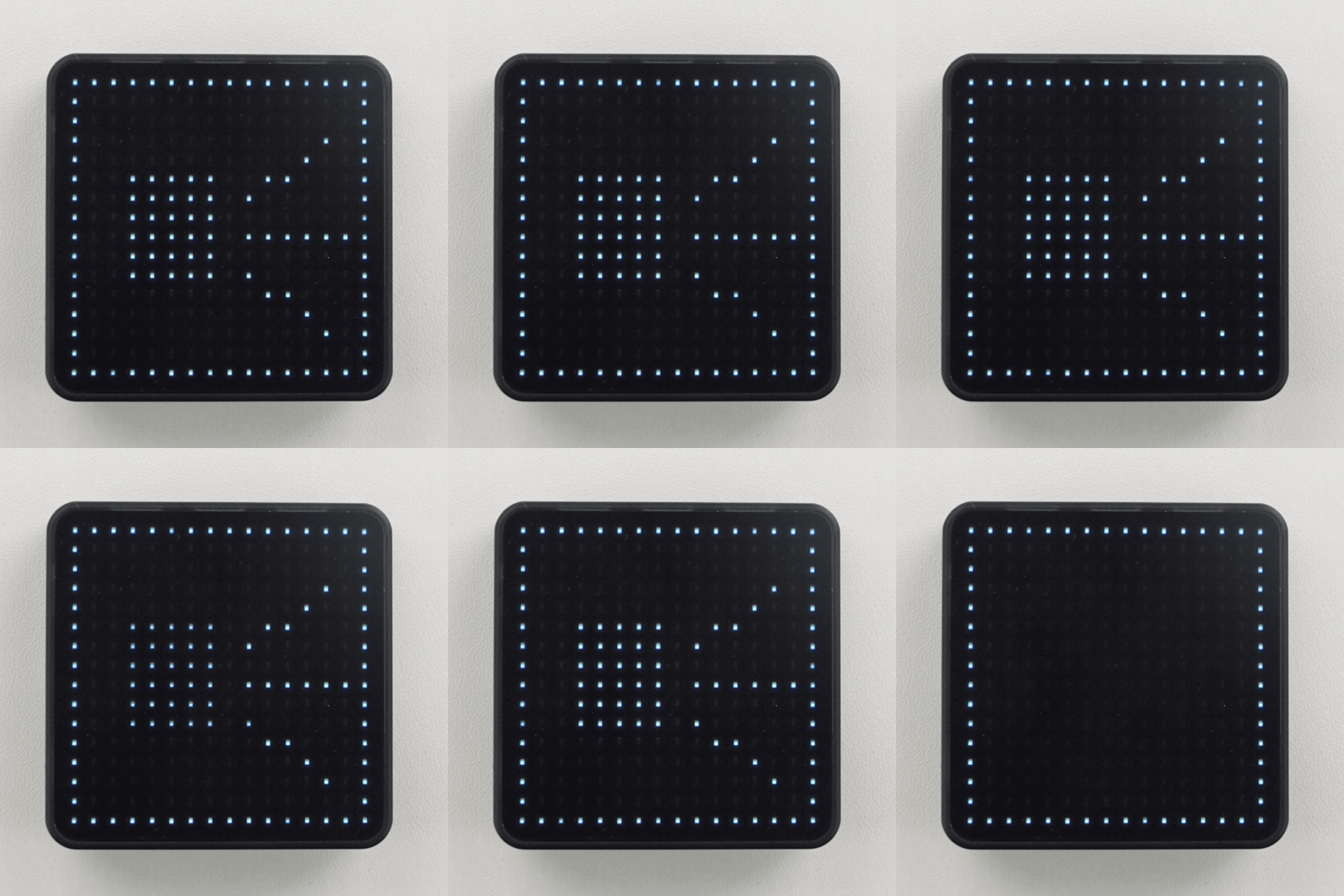
}The buzzer plays test tones at 880 Hz, 990 Hz, 1120 Hz, 1180 Hz, 1320 Hz, 1480 Hz, 1650 Hz, 1760 Hz, and 2731 Hz in sequence, each lasting 500 ms. A speaker icon is shown on the LED matrix while a tone is playing.
Page Tools