

Arduino Quick Start
2. Devices & Examples
3. M5Unified
4. M5GFX
5. Extensions
Unit
Module
Atomic
Tab5
IoT
Accessories
CoreMatrix Sleep and Wakeup
CoreMatrix sleep and wakeup APIs and example program.
Example Program
Compilation Requirements
- M5Stack Board Manager Version >=
3.3.10-a - Board Selection =
M5CoreMatrix - M5Unified Library Version >=
0.2.29 - M5GFX Library Version >=
0.2.36
The example below uses KEY1 to enter light sleep for 5 seconds and KEY2 to enter deep sleep for 5 seconds, demonstrating the timed wakeup flow.
cpp
1 2 3 4 5 6 7 8 9 10 11 12 13 14 15 16 17 18 19 20 21 22 23 24 25 26 27 28 29 30 31 32 33 34 35 36 37 38 39 40 41 42 43 44 45 46 47 48 49 50 51 52 53 54 55 56 57
#include <M5Unified.h>

static constexpr uint64_t SLEEP_TIME_US = 5000000ULL;

static void drawPattern(uint8_t pattern)
{
  M5.Display.startWrite();
  M5.Display.fillScreen(TFT_BLACK);
  M5.Display.drawRect(0, 0, 16, 16, TFT_WHITE);

  if (pattern == 0) {
    M5.Display.fillRect(7, 7, 2, 2, TFT_WHITE);
  } else if (pattern == 1) {
    M5.Display.fillRect(5, 5, 6, 6, TFT_WHITE);
  } else {
    M5.Display.drawRect(3, 3, 10, 10, TFT_WHITE);
  }

  M5.Display.endWrite();
  M5.Display.display();
}

void setup()
{
  auto cfg = M5.config();
  cfg.serial_baudrate = 115200;
  M5.begin(cfg);

  M5.Display.setColorDepth(8);
  M5.Display.setRotation(1);
  M5.Display.setBrightness(128);

  drawPattern(0);
}

void loop()
{
  M5.update();

  if (M5.BtnA.wasClicked()) {
    Serial.println("KEY1: light sleep for 5 seconds");
    drawPattern(1);
    delay(200);
    M5.Power.lightSleep(SLEEP_TIME_US);
    Serial.println("Light sleep woke up");
    drawPattern(2);
  }

  if (M5.BtnB.wasClicked()) {
    Serial.println("KEY2: deep sleep for 5 seconds");
    drawPattern(1);
    delay(200);
    M5.Power.deepSleep(SLEEP_TIME_US);
  }

  delay(20);
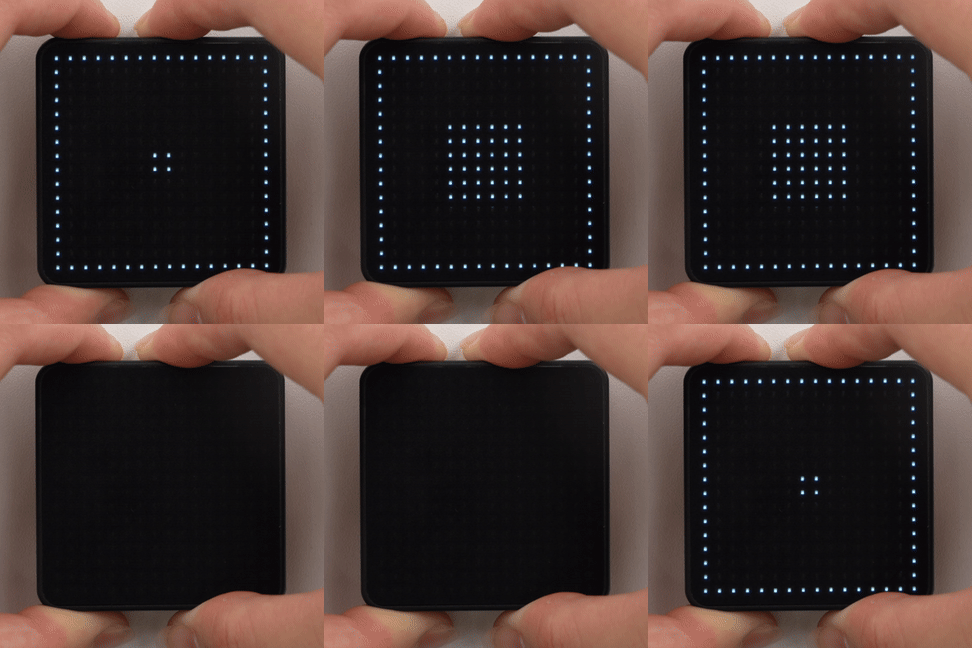
}After startup, a 2 x 2 square is shown in the center of the matrix. Press KEY1 to enter light sleep; after 5 seconds, execution resumes from the point of the call and a square is displayed. Press KEY2 to enter deep sleep; after 5 seconds, the device resets and restarts from setup(), and the matrix shows the center square again.
API
The CoreMatrix sleep and wakeup section uses Power_Class from the M5Unified library. For more related APIs, refer to the following documentation:
Page Tools