

Arduino Quick Start
2. Devices & Examples
3. M5Unified
4. M5GFX
5. Extensions
Unit
Module
Atomic
Tab5
IoT
Accessories
CoreMatrix Display
Description
CoreMatrix uses the M5GFX library as the LED matrix driver. Refer to the API and example below to implement simple display functions. For more API details, refer to the M5GFX documentation.
Example Program
Compilation Requirements
- M5Stack Board Manager Version >=
3.3.10-a - Board Selection =
M5CoreMatrix - M5Unified Library Version >=
0.2.29 - M5GFX Library Version >=
0.2.36
The power for the 16 x 16 white LED matrix is controlled by M5IOE1 IO4 / PYB_LEDS_EN. M5GFX turns on the matrix power automatically during initialization.
cpp
1 2 3 4 5 6 7 8 9 10 11 12 13 14 15 16 17 18 19 20 21 22 23 24 25 26 27 28 29 30 31 32 33 34 35 36 37 38 39 40 41 42 43 44 45 46 47 48 49 50 51 52 53 54 55 56 57 58 59 60 61 62 63 64 65 66 67 68 69 70 71 72 73 74
#include <M5Unified.h>

static constexpr int kSquareSize = 2;
static constexpr int kMinX = 1;
static constexpr int kMaxX = 13;

static int squareX = kMinX;
static int direction = 1;
static bool reachedRight = false;

static void drawFrame()
{
  M5.Display.startWrite();
  M5.Display.fillScreen(TFT_BLACK);
  M5.Display.drawRect(0, 0, 16, 16, TFT_WHITE);
  M5.Display.fillRect(squareX, 7, kSquareSize, kSquareSize, TFT_WHITE);
  M5.Display.endWrite();
  M5.Display.display();
}

static void drawOk()
{
  M5.Display.startWrite();
  M5.Display.fillScreen(TFT_BLACK);
  M5.Display.drawRect(0, 0, 16, 16, TFT_WHITE);
  M5.Display.setTextColor(TFT_WHITE, TFT_BLACK);
  M5.Display.setTextDatum(textdatum_t::middle_center);
  M5.Display.drawString("OK", 8, 8);
  M5.Display.endWrite();
  M5.Display.display();
}

void setup()
{
  auto cfg = M5.config();
  cfg.serial_baudrate = 115200;
  M5.begin(cfg);

  M5.Display.setColorDepth(8);
  M5.Display.setRotation(1);
  M5.Display.setBrightness(128);

  Serial.printf("CoreMatrix display: %d x %d\n",
                static_cast<int>(M5.Display.width()),
                static_cast<int>(M5.Display.height()));
  drawFrame();
}

void loop()
{
  squareX += direction;

  if (squareX >= kMaxX) {
    squareX = kMaxX;
    direction = -1;
    reachedRight = true;
  } else if (squareX <= kMinX) {
    squareX = kMinX;

    if (reachedRight) {
      drawFrame();
      delay(200);

      drawOk();
      delay(1000);

      reachedRight = false;
      direction = 1;
    }
  }

  drawFrame();
  delay(120);
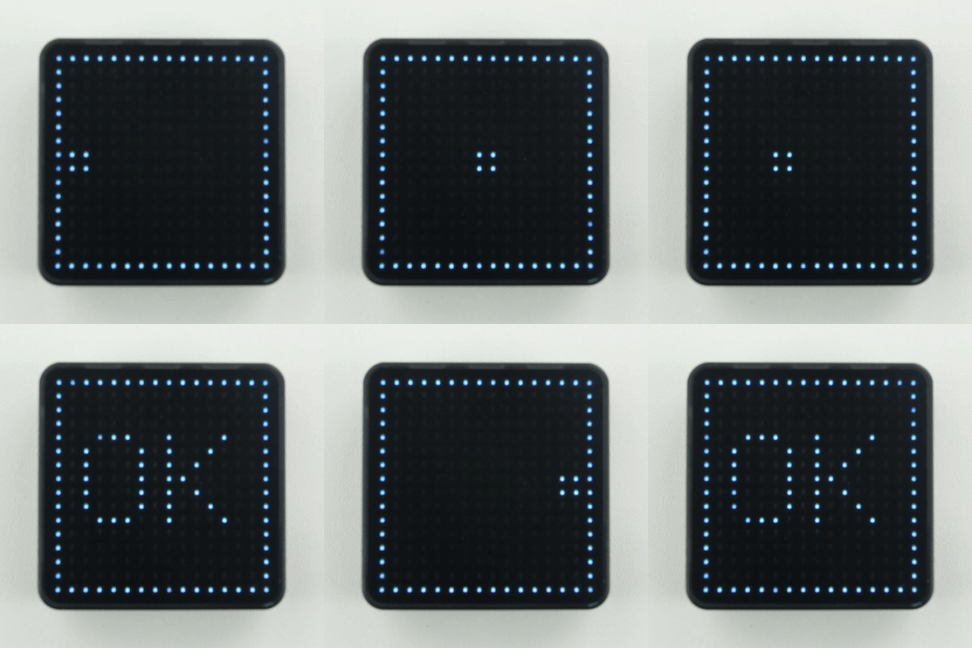
}After uploading, the matrix shows a 16 x 16 border, and a 2 x 2-pixel square moves from left to right inside the border and then back. After completing one round trip, the matrix displays OK, and the square resumes moving.
Page Tools